Sustainability Communication and Action
Local information
You are unlikely to find scholarly texts or academic papers about specific community initiatives. It is a good idea to use local sources, such as newspapers and government websites, to find this information. You can then search for scholarly texts on the broader topic and apply this information to the local issue or context. The following databases are useful sources for Australian newspapers:
Google can also be a useful tool for finding local news sources and regional information. See Search Google for tips on how to carry out an effective search.
Start your search
Start by identifying the main ideas or concepts in your topic. These become the foundation of your keyword search and are an excellent starting point for your research.
Let’s look at a sample topic: “How can smart irrigation systems contribute to water conservation in cities”
From the topic above there are three main concepts:
- Smart irrigation
- Water conservation
- Cities
Search the library catalogue
The Curtin Library catalogue is a useful place to start searching for scholarly sources. It includes a variety of resources, such as journal articles, conference papers, reports, book chapters and ebooks. Watch the following video for an introduction to searching in the catalogue:
Search the library databases
Databases are large, searchable collections of scholarly literature. Some cover a wide range of subjects (multidisciplinary), while others focus on a particular discipline (subject‑specific). A full list of databases is available via the Databases page.
Databases provide more advanced search features than the Library Catalogue, making it easier to narrow your results and locate relevant, high‑quality material. In some subject areas, specialist databases also include unique content that may not be available anywhere else.
We recommend starting with a simple search in the ProQuest database, using your main concepts. Enter each concept into a separate search box. These boxes are connected by AND, meaning the database will retrieve only articles that include all of your search concepts.
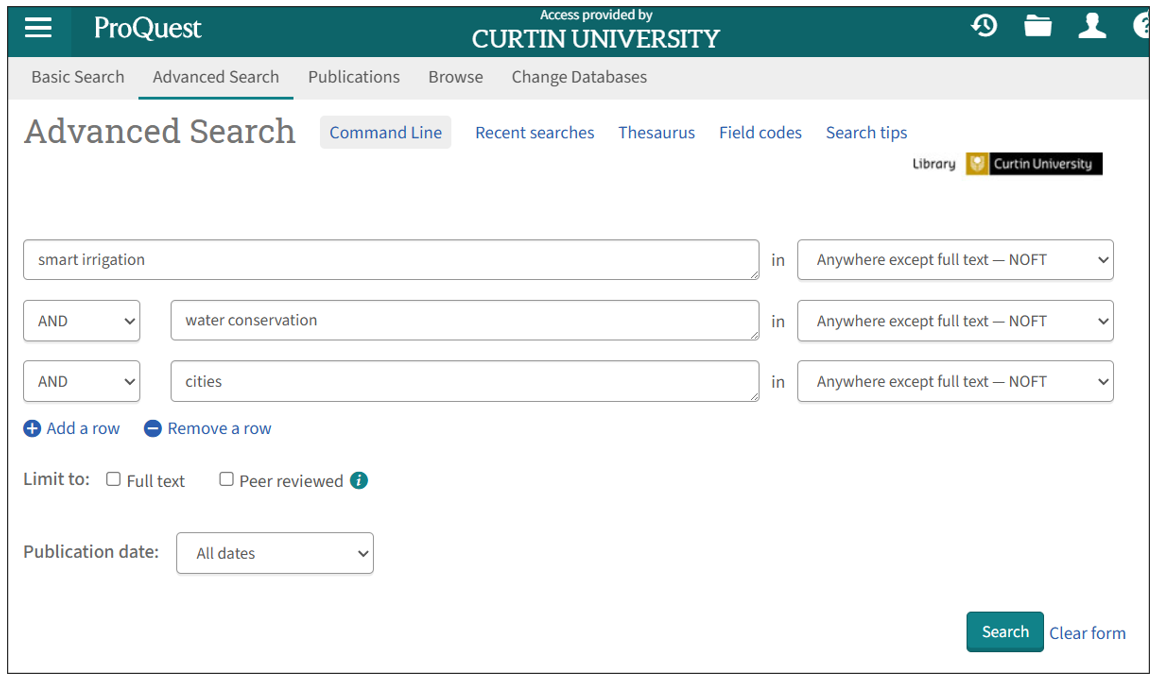
If you are not finding relevant journal articles or you are not finding as much information as you would like, see the following tips for expanding your search.
Expand your search strategy
Authors often use different keywords to describe the same concept. For example, one author might use the term teenagers, another adolescents, and another young people. Although these words refer to the same idea, searching for just one of the terms will retrieve only some of the available research.
Adding additional keywords—such as synonyms, related terms, or alternative phrases—broadens your search and helps you find more relevant sources on your topic.
For our sample topic some alternative terms for each of the main concepts could be:
- Smart irrigation - smart controllers, sustainable irrigation
- Water conservation - water saving, water management, water efficiency
- Cities - city, urban
-
AND is used to combine different search concepts. It narrows your search so you only retrieve resources that cover all of the concepts together. For example, a search for Smart irrigation AND water conservation will only return records containing both the terms smart irrigation and water conservation.
-
OR is used to combine similar keywords. It broadens your search by looking for sources that contain any of your terms. For example, a search for water conservation OR water saving will locate records containing either the terms water conservation or water saving.
You can use these tips in the Library catalogue and databases to enhance your search:
-
The truncation symbol (usually an asterisk *) is useful for finding different endings of a word. It is added after the last common letter of the variations. For example the search term educat* will search for educate, educates, education, educated, educating, educator.
-
Phrase searching means searching for two words or a string of words as an exact phrase. By using this technique you will only retrieve articles where those words appear together in the text. To search for a phrase, add double quotes around the terms. For example: “water conservation”.
The following video demonstrates how to perform an expanded search in the ProQuest database:
One search may not find all the resources you need for your assessment. You might need to run several searches using different combinations of your keywords to find information on different aspects of your topic.
For example: you may want to find sources on how a particular initiative contributes to the Sustainable Development Goals (SDGs) or how an SDG is applied in a specific context.
- smart irrigation OR smart controllers OR sustainable irrigation AND sustainable development goals OR SDGs
- sustainable development goal 11 AND Australia
Search Google
Google is a useful source for finding reports, as well as news sources and local information. The search tips below can help you carry out a targeted search to find sources that are relevant to your topic.
Did you know? You can use AND and OR, phrase searching and truncation in Google and other search engines!
You can focus your search results by typing your keywords into Google and adding site: followed by the type of website you want to search.
For example, if you are looking for Australian government information about smart irrigation, a search for smart irrigation will return results from newspapers, organisations, and blogs. However, searching for smart irrigation site:gov.au will only show information from Australian government websites.
Types of websites:
- .edu signifies that the page is created by an educational institution
- .gov signifies that the page is created by a government department or body
- .org, .com or .co signifies a site created for marketing reasons. These include news sites and the websites of organisations (though you should note that there are no specific requirements for creating a .org web address, and it should not be interpreted as a sign of quality)
- Country codes allow you to search sites that have been published within a geographical area
Reports and similar resources are often available in PDF format. You can search for these by typing your keywords into Google and adding filetype: followed by the file type you want.
For example, sustainable development goal 11 filetype:pdf