
Sustainability-Communication-and-Action-printable-guide-UniSkills.pdf
Sustainability Communication and Action
Table of Contents
Introduction
This guide is designed to complement the ENST1001/ENST1002 Sustainability Communication and Action unit. It introduces you to the academic research process and provides tips and tricks for completing your assessment tasks.

What you will learn
- What scholarly sources are and how they differ from non-scholarly sources
- How and where to search for scholarly and other credible sources
- Academic writing and presentation skills
- The importance of referencing
- Using Generative AI Scholarly sources
What are scholarly sources?
Scholarly sources are written by academics, researchers and other experts in a particular field of study. Their purpose is to share recent research, theories, analyses and insights, or to provide summaries of current thinking in the field. Scholarly sources can include materials such as:
Journal articles
In-depth articles written by experts in a particular field of study. They are published in journals (essentially magazines but for an academic audience) which are usually published multiple times per year and are organised by volumes and issues.
Examples:
- Smart City Strategies – A Driver for the Localization of the Sustainable Development Goals?
- Smart Cities and Sustainable Development Goals (SDGs): A Systematic Literature Review of Co-benefits and Trade-offs
Books and book chapters
Provide an in-depth overview on a particular research topic. Collections of articles or chapters, written by different authors, are often collated into an edited book focusing on a topic area.
Examples:
- Sustainable Development Goals: Their Impact on Forests and People
- Multi-facets of Smart Cities Governance Models
Conference papers
An individual research paper that was presented at an academic conference. Papers from the same conference are often compiled into a single publication known as a conference proceeding.
Examples:
- Urban Transport Planning, ITS and Energy Resources: A Framework for Smart City Case Studies
- #thisismymob: Preserving and promoting Indigenous Australian cultural heritage
What is peer-review?
Some scholarly sources, particularly journal articles, undergo an editorial process known as peer-review, in which the item is sent to other experts (peers) in the same field as the author(s) for review before publication. These peers review the item to ensure the research presented is accurate and reliable, and based on sound research methodologies. The peers are often ‘blinded’ so they do not know who has written the article to minimise potential for bias in their feedback. </div>
Scholarly vs. popular sources
The following table outlines some differences between scholarly and popular sources
| Features | Scholarly | Popular |
|---|---|---|
| Authors | Written by experts in the field. Qualifications and affiliations are usually listed. | Written by journalists, staff writers or bloggers, who may not have qualifications in the field. |
| Audience | Aimed at academics, researchers and students. Provides detailed, in-depth analysis. | Aimed at the general public. Broad, easy-to-read coverage. |
| Purpose | To share original research and findings in a specific field. | To inform, entertain, persuade or express an opinion. |
| Language | Uses technical, discipline-specific language. | Uses simple, everyday language and may include emotional or persuasive wording. |
| Review | Often checked by other experts in the same field (peer-reviewed) before being published. | Reviewed by editors, not necessarily experts. |
| Supporting documentation | Includes references and evidence to support claims. | Usually do not provide full references, though they may mention recent studies. |
| Images | Uses charts, graphs and tables to support the text. | Often includes colourful images and advertisements. |
How do I know if a source is scholarly?
The following points can help you decide if a source is scholarly:
- Authors - are the authors given? Are they affiliated with an educational or research institution or government agency? Do they provide their educational qualifications?
- Audience - is it written for an academic audience (scholars, researchers)? Does it use specialised or discipline specific language?
- Purpose - why has the source been written? Is it to report on or summarise research on a topic?
- References - does it provide references to support the research?
- Peer-review - has it undergone peer review (this mostly applies to journal articles)?
Credible sources
In addition to scholarly sources, you may be required to use other credible sources in your assessments. These are trustworthy and accurate sources, such as well-known news outlets, trade journals, government reports and local government websites.Searching for sources
Local information
You are unlikely to find scholarly texts or academic papers about specific community initiatives. It is a good idea to use local sources, such as newspapers and government websites, to find this information. You can then search for scholarly texts on the broader topic and apply this information to the local issue or context. The following databases are useful sources for Australian newspapers:
Google can also be a useful tool for finding local news sources and regional information. See Search Google for tips on how to carry out an effective search.
Start your search
Start by identifying the main ideas or concepts in your topic. These become the foundation of your keyword search and are an excellent starting point for your research.
Let’s look at a sample topic: “How can smart irrigation systems contribute to water conservation in cities”
From the topic above there are three main concepts:
- Smart irrigation
- Water conservation
- Cities
</div>
Search the library catalogue
The Curtin Library catalogue is a useful place to start searching for scholarly sources. It includes a variety of resources, such as journal articles, conference papers, reports, book chapters and ebooks. Watch the following video for an introduction to searching in the catalogue:
Search the library databases
Databases are large, searchable collections of scholarly literature. Some cover a wide range of subjects (multidisciplinary), while others focus on a particular discipline (subject‑specific). A full list of databases is available via the Databases page.
Databases provide more advanced search features than the Library Catalogue, making it easier to narrow your results and locate relevant, high‑quality material. In some subject areas, specialist databases also include unique content that may not be available anywhere else.
We recommend starting with a simple search in the ProQuest database, using your main concepts. Enter each concept into a separate search box. These boxes are connected by AND, meaning the database will retrieve only articles that include all of your search concepts.
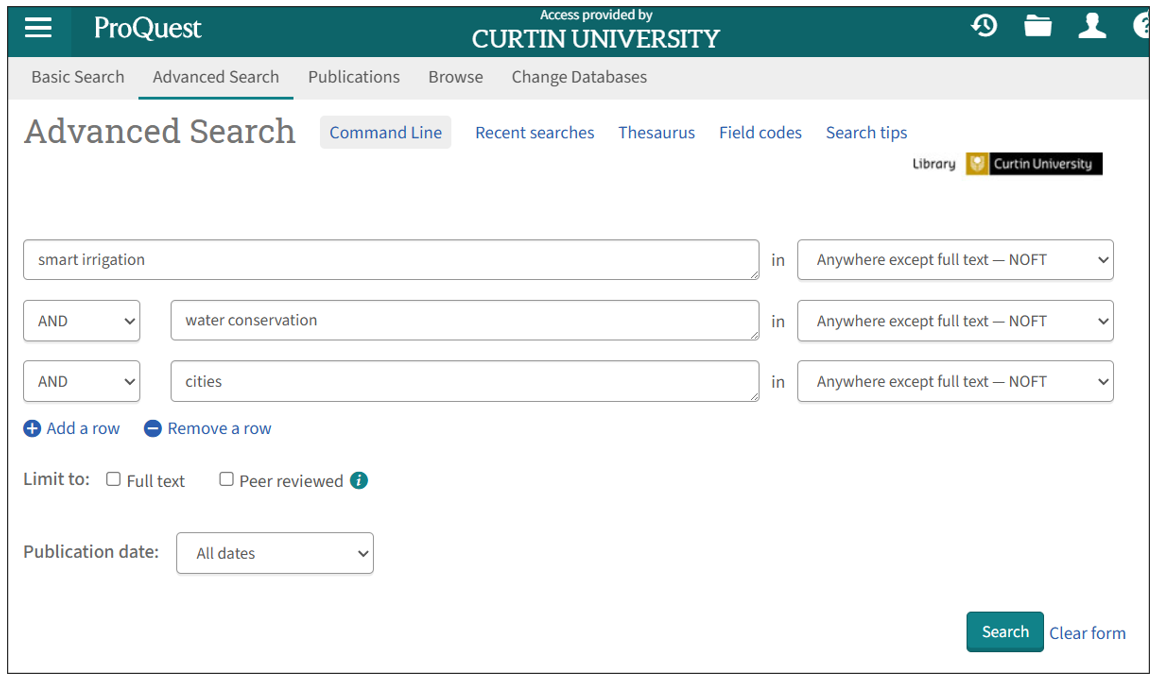
If you are not finding relevant journal articles or you are not finding as much information as you would like, see the following tips for expanding your search.
Expand your search strategy
Find alternative terms
Authors often use different keywords to describe the same concept. For example, one author might use the term teenagers, another adolescents, and another young people. Although these words refer to the same idea, searching for just one of the terms will retrieve only some of the available research.
Adding additional keywords—such as synonyms, related terms, or alternative phrases—broadens your search and helps you find more relevant sources on your topic.
For our sample topic some alternative terms for each of the main concepts could be:
- Smart irrigation - smart controllers, sustainable irrigation
- Water conservation - water saving, water management, water efficiency
- Cities - city, urban
Combine your search terms using AND and OR
-
AND is used to combine different search concepts. It narrows your search so you only retrieve resources that cover all of the concepts together. For example, a search for Smart irrigation AND water conservation will only return records containing both the terms smart irrigation and water conservation.
-
OR is used to combine similar keywords. It broadens your search by looking for sources that contain any of your terms. For example, a search for water conservation OR water saving will locate records containing either the terms water conservation or water saving.
Truncation and phrase searching
You can use these tips in the Library catalogue and databases to enhance your search:
-
The truncation symbol (usually an asterisk *) is useful for finding different endings of a word. It is added after the last common letter of the variations. For example the search term educat* will search for educate, educates, education, educated, educating, educator.
-
Phrase searching means searching for two words or a string of words as an exact phrase. By using this technique you will only retrieve articles where those words appear together in the text. To search for a phrase, add double quotes around the terms. For example: “water conservation”.
The following video demonstrates how to perform an expanded search in the ProQuest database:
One search may not find all the resources you need for your assessment. You might need to run several searches using different combinations of your keywords to find information on different aspects of your topic.
For example: you may want to find sources on how a particular initiative contributes to the Sustainable Development Goals (SDGs) or how an SDG is applied in a specific context.
- smart irrigation OR smart controllers OR sustainable irrigation AND sustainable development goals OR SDGs
- sustainable development goal 11 AND Australia
</div>
Search Google
Google is a useful source for finding reports, as well as news sources and local information. The search tips below can help you carry out a targeted search to find sources that are relevant to your topic.
Did you know? You can use AND and OR, phrase searching and truncation in Google and other search engines!
</div>
Search within specific types of websites
You can focus your search results by typing your keywords into Google and adding site: followed by the type of website you want to search.
For example, if you are looking for Australian government information about smart irrigation, a search for smart irrigation will return results from newspapers, organisations, and blogs. However, searching for smart irrigation site:gov.au will only show information from Australian government websites.
Types of websites:
- .edu signifies that the page is created by an educational institution
- .gov signifies that the page is created by a government department or body
- .org, .com or .co signifies a site created for marketing reasons. These include news sites and the websites of organisations (though you should note that there are no specific requirements for creating a .org web address, and it should not be interpreted as a sign of quality)
- Country codes allow you to search sites that have been published within a geographical area
Search for specific file types (such as PDFs)
Reports and similar resources are often available in PDF format. You can search for these by typing your keywords into Google and adding filetype: followed by the file type you want.
For example, sustainable development goal 11 filetype:pdf
Writing and referencing
Academic writing skills The UniSkills platform is designed to help improve your academic writing, study, numeracy and digital skills. The self-paced modules take you through the academic writing process:
-
Reading introduces you to reading techniques, evaluating the sources you find, reading critically, and note-taking.
-
Writing introduces you to academic writing, the structure and mechanics of sentences, how to use punctuation effectively, the elements involved in report writing, and how to edit and proofread your assessment.
-
Integrating sources guides you through the basics of paraphrasing, summarising and quoting in your academic work.
Presentation skills
The Presentations guide shows you how to structure and practise your presentation, design cohesive and accessible slides and posters, source and reference images, engage your audience, handle questions with confidence, and present successfully both in person and online.
Referencing
Referencing is the practice of acknowledging the sources of information, ideas, or data you use in your assessments. It involves citing these sources within your text and providing full details in a reference list.
Referencing is an important part of your academic work. Good referencing:
- Demonstrates the depth and quality of your research
- Provides evidence to support the arguments that you are making in your assessment
- Assists the reader in locating the sources that you have referred to
- Acknowledges the work of other researchers and helps to avoid plagiarism.
APA style referencing guide For this unit, you will need to use the APA 7th referencing style. To format your references, refer to the Curtin Library referencing guide, which provides guidance and examples for in-text citations and reference list entries:
Useful resources:
- See our handy APA referencing checklist for points to pay attention to when editing your in-text citations and reference list
- Watch how to create a hanging indent in Microsoft Word and PowerPoint (YouTube video)
- See a sample reference list in APA style Gen AI
Gen-AI
Generative artificial intelligence (Gen-AI) is a type of technology that creates new content like text, images, audio, video or code based on patterns in data, probability and human feedback. As part of the unit, you may need to use Gen-AI tools to complete certain tasks. Check your unit outline or assessment guidelines or ask your tutor for information about how and when you can use these tools.
- The Gen-AI module in UniSkills, provides an introduction to Gen-AI, including how it works, how to use it effectively and ethically at university, and how to prompt well.
Referencing Gen-AI
The APA referencing guide has information on referencing AI-generated content in your work.
- Learn how to reference Gen-AIAbout UniSkills
UniSkills was created and is maintained by Curtin University Library. To report issues with UniSkills contact Library Help.
Twemoji icons by Twitter, Inc and other contributors, licensed under a CC-BY 4.0 licence.
Except where otherwise noted, UniSkills content in all it’s forms (website, PDFs etc) are licensed under a Creative Commons Attribution ShareAlike 4.0 International Licence. We ask that you attribute any use of the content as created by Curtin University Library with a link to the Library website.
This license does not extend to other Curtin University and Curtin University Library webpages, or to Curtin branding and trademarks. Curtin University’s copyright information is available on the Curtin website.