
Gen-AI-printable-guide-UniSkills.pdf
Gen-AI
Table of Contents
Introduction
Generative artificial intelligence (Gen-AI) is a type of technology that creates new content like text, images, audio, video or code based on patterns in data, probability and human feedback. This technology has advanced rapidly in recent years and is having impacts in the personal and professional lives of people around the globe.
By completing the Gen-AI module in UniSkills, you will learn how to use Gen-AI tools in a careful and creative way. You will also learn to think about what Gen-AI means for you as a student and as a future professional.
What you will learn
- Understand what Gen-AI is and how it works
- Learn how to use Gen-AI tools effectively at university
- Unpack current issues with Gen-AI and think about the future
- Upskill with Gen-AI by practising prompting
- Understand how to declare and reference Gen-AI content correctly in your assessments
Things to keep in mind It is important to understand that Gen-AI tools are not truly intelligent – all outputs are based on probability informed by the information they have been trained on. While the technology is advancing quickly, Gen-AI tools are still known to make mistakes (called hallucinations) and can provide biased or incomplete information.
For more information about the history, training and ethics of AI, complete our 23 Things Module: AI.
While there are many ways that Gen-AI can help with study or assessment, you must follow your unit guide or assessment rules to make sure you are allowed to use it. If you use Gen-AI without permission for an assessment, it may break academic integrity rules.
How to use this guide This is a self-paced guide designed to support the AI learning competencies developed by Curtin University Library.
Each section builds on the previous one, so it is best to complete them in order. Work through each page, complete the challenge activity at the end, and then click Next to continue.
You can also navigate using the tabs at the top of the page.
Return to this guide whenever you need a refresher. If you require extra help, contact libraryhelp@curtin.edu.au.
Quick Takeaways If you are short on time or want a simple document that explains the basics of Gen-AI, check out our Mini Gen-AI Guide that includes:
- A list of popular Gen-AI tools and their common uses
- Tips for using Gen-AI responsibly as a Curtin student
- How to reference Gen-AI in your work
Download Curtin Library Mini Gen-AI Guide [PDF, 360kB]
However, it is recommended that you work through all the pages in this module.
This will help you:
- Keep up with changes in Gen-AI
- Think more clearly and ask better questions about this technology
- Learn better with Gen-AI support now and be ready for the future
Related resources
- Curtin University Library’s Critical thinking module
- Curtin University Library’s Critical reading guide
- Curtin University Library’s Gen-AI workshops
- Appropriate use of Gen-AI technologies
- Academic Integrity Guide for Students
- GenAI Guidance for Students
Not what you’re looking for? I want to…
- Learn how to find scholarly sources
- Learn how to paraphrase, summarise and synthesise information
- Improve my academic writing skills
- Learn how to write a report, essay or another assignment type
Understand
Understanding Gen-AI
The easiest way to understand generative AI is to start at the beginning. This section introduces what it is and how it works. Understanding these ideas will give you a clearer picture of the technology behind the tools you might already be using.
A brief history of AI The term “artificial intelligence” (AI) was first used in 1956 at a workshop held at Dartmouth College. This event is seen as the official start of the field of AI. But even before that, in the early 1950s, people were already interested in the idea of machines that could “think”.
These early machines were computers and other devices programmed to mimic human intelligence. One of the key figures in this area was Alan Turing. He suggested that if a machine could do tasks that usually needed human intelligence, then it could be said to “think”.
Despite the black-and-white broadcast and dated style, the 1961 CBS documentary The Thinking Machine, created for MIT’s 100th anniversary, still feels relevant today. Even more than sixty years ago, early computer technology—what would eventually lead to AI—sparked strong public reactions.
The documentary aimed to calm fears by showing that AI is simply computers following set rules, not something mysterious.
Jump to 31:13 in the video to see an example of early programming. In this clip, an MIT scientist demonstrates how a transistor computer called TX-0 created a movie script. The process may remind you of how we use Gen-AI tools today, giving you a point of comparison as you read on.
1960s and 1970s
Work on these “thinking machines” continued through the 1960s. Expert systems, programs designed to copy human decision-making using rule-based logic, became popular in the 1970s and peaked during the 1980s. They declined in the late 1980s during what is called the AI winter. These systems had two main parts: a knowledge base and an inference engine. They worked together to solve problems using if-then rules, similar to those used in TX-0. Today, AI technology more commonly uses systems like neural networks.
1980s and 1990s
From the late 1980s into the 1990s, digital technology advanced quickly. The internet appeared, and big data became important. Large collections of language data (called corpora) allowed breakthroughs in natural language processing (NLP)—the ability for computers to process, analyse and generate human language. This had been a dream for computer scientists since the 1950s. Public interest in AI grew again in 1997 when IBM’s supercomputer, DeepBlue, beat world chess champion Garry Kasparov.
2000s and 2010s
In the early 2000s and 2010s, computing power grew quickly thanks to more available data and better algorithms. With advancements in machine learning, and especially the rise of deep learning using a neural network called a transformer in 2017, computers got much better at processing language as humans naturally use it. In fact, the “T” in ChatGPT stands for this breakthrough technology.
What was so revolutionary about transformer technology in terms of NLP was its ability to go beyond linear processing. Older systems processed words one by one and struggled to remember words far apart from each other. Transformers process all words at once and give them attention weights, creating relationships between words based on their importance.
The first big success of this technology was in machine translation. Google Translate became much more fluent and accurate after using this new method. Transformer architecture changed NLP and, combined with techniques like reinforcement learning from human feedback, made tools like ChatGPT possible.
Today
On 30 November 2022, after several earlier versions, the company OpenAI released a demo of its AI chatbot called ChatGPT (version 4.0). ChatGPT amazed people with how well it could respond to written questions and instructions. Within just five days, over one million people were using it.
The technology behind ChatGPT is known as generative artificial intelligence (Gen-AI). This is different from older AI because it can create new content like text, images, or music, instead of just analysing or sorting existing data.
What is Gen-AI
AI
AI is a broad term that refers to computer systems designed to do tasks that usually require human intelligence, such as recognising speech, making decisions, or sorting large amounts of data. Traditional AI systems are trained to do one specific job really well. They follow patterns they have learned from data to give you consistent, reliable results. You use AI every day in things like:
- Search engines to find relevant results
- Recommendation systems like Netflix
- Fraud detection in banking
- Robotics for movement and interaction
While AI is highly accurate and efficient within its defined scope, it is limited to specific tasks and lacks the creativity and flexibility of newer technologies—making it important to understand where its strengths and limitations lie.
Gen-AI
Gen-AI is a newer type of AI that goes beyond pattern recognition to create original content. It learns from large datasets and uses that knowledge to generate text, images, music, or interactive environments. Gen-AI is more flexible and creative than traditional AI, with applications in:
- Writing blog posts, marketing copy, or academic summaries
- Generating realistic images for product design or advertising
- Composing original music tracks for videos or games
- Building immersive virtual worlds for gaming or training simulations
While Gen-AI’s versatility is exciting, it also raises concerns about job impact, misinformation, and misuse—making it important to understand both its benefits and risks.
Even Gen-AI is a broad term because the processes for generating different types of content are not the same. However, they share a common history and have similarities in how, for example, a chatbot produces text and an image generator makes a picture.
Models
To make sense of how Gen-AI tools work, it helps to understand the systems that power them. These systems are called models, and they’re at the heart of how tools like ChatGPT, DALL·E, and others generate text, images, and more. In this section, we’ll look at what models are and why they matter when using Gen-AI tools.
Large language models
You may hear Gen-AI tools like ChatGPT called an LLM. This stands for large language model and is linked to natural language processing. An LLM is the system that allows a tool like ChatGPT to generate text. It is a computer system (a neural network) trained on lots of text that works inside software to create new text based on patterns it has learned.
Different companies behind Gen-AI tools have created their own LLMs. These models vary because their training data and processing are unique. This is important and will be discussed later.
You don’t have to be a big company to create an LLM, but it can be expensive. There are also small language models created by individuals or groups who share them freely on open-source websites. These can be used to create private GPTs.
Generative image models
Different again are generative image models, such as GAN or diffusion models. These are trained on pictures and text. They create new images based on patterns they have learned and the instructions they receive. These are the models behind tools like DALL·E 2, Stable Diffusion, or in the case of text-to-video generation, Sora from OpenAI.
Large multimodal models
Many tools today are multimodal, meaning their models are trained on multiple types of data in order to process and produce text, audio, images, videos, code and more. These tools still use the same technology of transformers that make LLMs possible, and are therefore sometimes referred to as large multimodal models (LMMs).
Retrieval-augmented generation
Most Gen-AI tools will also use retrieval-augmented generation (RAG). This is a method that helps Gen-AI give better answers by using external material like documents specified by the user to inform its output. It first finds useful information within the external material, then uses that to create a response. Some tools can also fetch live data from the internet for local and timely answers.
In short, a model is a multidimensional mapping of identified patterns from large amounts of data, which can be text, audio, video or other types, and acts as a knowledge base for Gen-AI tools.
Training Most LLMs are developed as pre-trained models. This means that as they were given raw data and used unsupervised learning to find patterns with no labels or correct answers. This ‘learning’ is done by applying a model’s mathematical frameworks (algorithms) to a sample dataset whose data points serve as the basis for the model’s future output. These overfitted models can generalise from the training data, but like a jack-of-all-trades, need tailoring to be able to do more specific tasks well.
This tailoring is called fine-tuning, which uses supervised and reinforcement learning. Both of these training types require input or oversight from humans. In supervised learning, humans label extra data for the model to process. In reinforcement learning, the model learns through trial and error and humans correct it with rewards or penalties. Think of it like cooking: pre-training teaches basic techniques, fine-tuning focuses on a cuisine, and reinforcement learning perfects a specific dish through practice.
Reinforcement learning has been pointed to as one cause for hallucinations because models might learn that any answer is better than no answer. This can lead to incorrect or invented information. For example, if you ask a tool to produce sources with citations, it will give an answer, but the sources may be fake.
Gen-AI outputs can be biased because training data often reflects stereotypes, excludes diverse voices, or favours English and certain regions. Modern AI models work like “black boxes,” making it hard to explain how outputs are produced, which affects trust and accountability. Training on internet data raises copyright concerns, and strict Australian laws mean no AI tools have been trained locally.
Visit the Use section to learn how copyright effects you.
How does Gen-AI work Despite producing text that sounds human, these tools do not understand meaning. They rely entirely on statistical patterns, which is why their outputs must be checked carefully. Sometimes they generate responses that appear correct but are factually wrong. Think of Gen-AI as a helpful assistant—useful, but requiring review, feedback, and refinement.
Let’s take a look at the steps that occur when a Gen-AI tool generates written content. You’ll notice nowhere in the process does critical thinking occur - that’s your job.
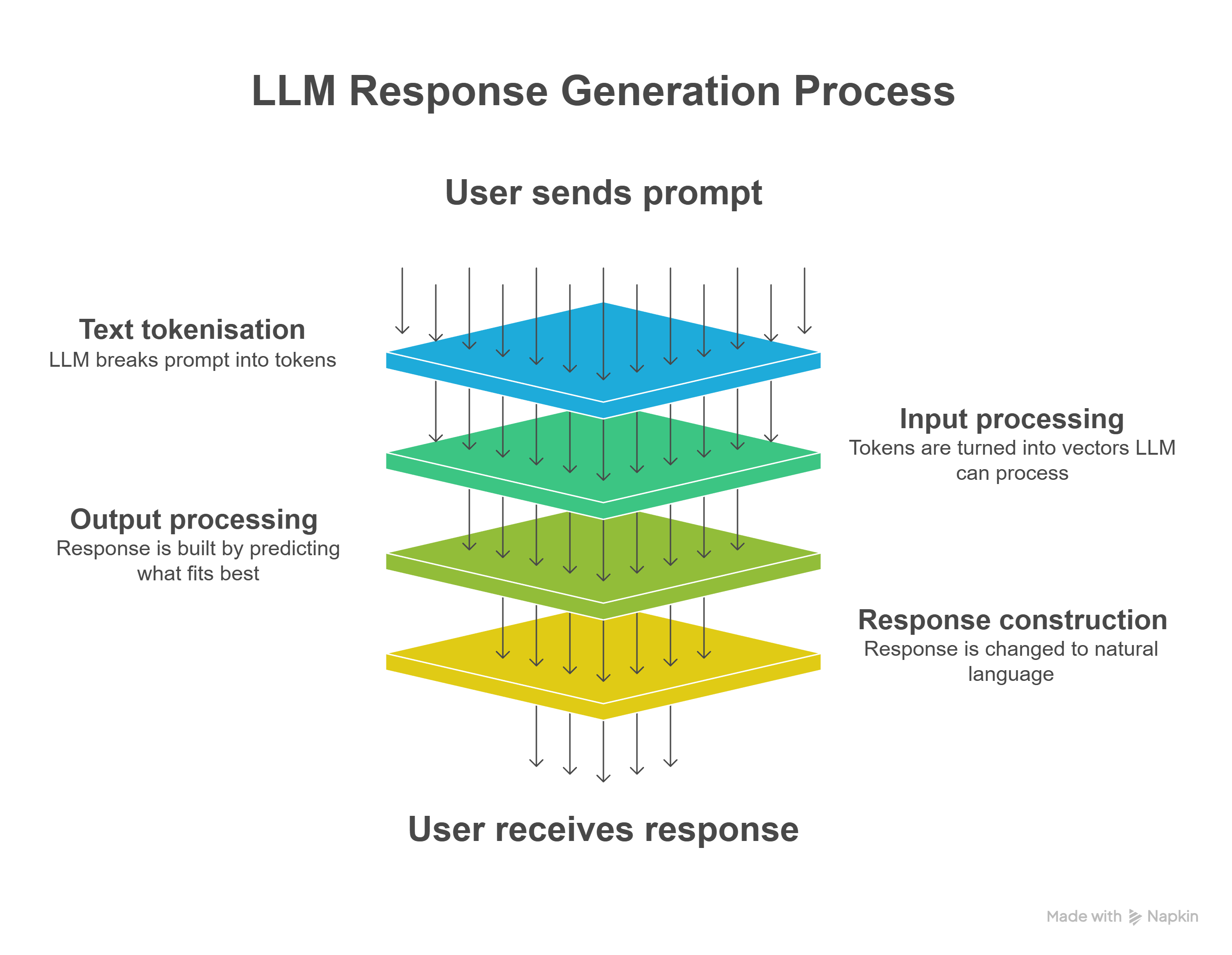
-
You send a message to the model behind your Gen-AI tool of choice, often Large Language Models (LLMs) like those from OpenAI (ChatGPT), Anthropic (Claude) or Google (Gemini). This message is called a prompt.
-
The LLM breaks your message into small parts called tokens. Tokens can be words, parts of words, or punctuation marks. These tokens are converted to sets of numbers called vectors.
-
The LLM uses the vectors to track how words and phrases are connected. It does this by using maths based on patterns identified from its training data. It may also use earlier messages in the conversation to help.
-
The LLM builds its response one word at a time. At each step, it predicts the word that is most likely to come next based on statistical patterns. The model looks at all the possible words it could choose, calculates which one is most likely to fit, and then adds it to the response. It keeps doing this until the response is complete.
-
The response is changed from tokens back to natural language and returned to you when it is complete.
</div>
LLMs operate within a limited context window—typically thousands of tokens. This means they can “remember” recent text in a conversation but not everything they’ve ever processed.
Gen-AI tools generate text based on probability, like advanced predictive text systems. They don’t think or reason—they calculate the most likely sequence of words using patterns learned from huge amounts of data. Each word choice comes from a probability distribution built on billions of examples.
The model doesn’t pick the next word at random; it evaluates context and relationships between tokens using a mechanism called attention. Transformers use this attention process to decide which parts of your prompt are most relevant when predicting the next word, as shown through the connections illustrated in the examples below. Transformers analyse all words simultaneously, calculating attention weights that show the importance of relationships between words.
Transformer Self-Attention
How Transformers Weight Word Relationships
Click on any word to see how the Transformer weighs its relationship with other words. These weights (in percent - %) show how much attention the ‘selected’ word pays to each word in the sentence.
Why This Matters
In the example above, when analysing the word “it”, the Transformer assigns a high attention weight to “animal” (despite the distance between them) and lower weights to other words. This allows the model to understand that “it” refers to “animal” rather than “street.” The model learns these weights during training, enabling it to capture complex linguistic relationships automatically.
Please note: These examples are provided for learning purposes only. The percentages shown do not reflect the exact weighting that would occur in practice.
</div>
Challenge: The Turing Test
Using Gen-AI A skilled Gen-AI user should, as put by librarian Kyle Bylin from at Saginaw Valley State University, have “the ability not just to use these tools, but to collaborate with them, to shape them, to direct their generative power toward genuinely meaningful discovery and creation”.
For an increasing number of individuals, AI technology is already playing a role in their professional and personal lives and will continue to do so. As we learned in the Understand section, this technology is powerful but must be used thoughtfully to avoid AI slop.
Before looking closely at how to use Gen-AI, there are two important issues to understand: privacy and copyright. Expand the sections below to learn more.
Before use
Privacy considerations
Gen-AI tools learn from large collections of public data. They may also use purchased datasets that include copyrighted works or intellectual property. Some tools keep learning from the data you enter, which means your input could be used for training.
Once you share personal information with a Gen-AI tool, it is hard to track, control, or delete it. That information might also be shared with other users.
Before using Gen-AI tools, ask yourself: Would I be comfortable if this information were seen by many people? If the answer is no, do not enter any personal or private details into a Gen-AI tool. This includes your name, email address, income, legal or medical details, or anything else you would not share publicly.
Use general terms instead of specific details.
Before choosing a Gen-AI tool, check its privacy policy. Ask yourself:
- Are my prompts used to train the AI?
- How is my data stored?
- Can I delete my data if I need to?
Additionally, if you are using sensitive data such as identifiable personal data of others, Indigenous data or health and medical data, you must inform yourself of proper practices in relation to Gen-AI.
Check out ARDC’s Working with Sensitive Data page for information.
Copyright considerations
Copyright is an automatic legal protection that gives creators control over how their original work is used, copied, or shared from the moment it is created. This means if you are not the creator of a work, you need to be aware of whether and how it can be shared with a Gen-AI tool. For information about how to use copyrighted material with Gen-AI tools, please see the Copyright and Gen-AI section of the Copyright Toolkit.
With these important points in mind, we can now explore how you can use Gen-AI at Curtin in a safe and responsible way.
You can use Gen-AI as a student at Curtin…
… (1) for study-related purposes.
Study-related purposes include all parts of your learning that will not be graded. Examples are:
- Making a study schedule
- Generating extra practice questions for an exam or test
- Helping to write or edit emails to classmates or academics
- Troubleshooting programs
Gen-AI can also help you look at topics from different angles, break down complex ideas into simpler explanations, or suggest links between concepts you are learning. Think of it as a study helper that can support brainstorming, clarify your thinking, or help you practise explaining ideas in your own words.
</div>
… (2) for assessment tasks if given written permission by a unit coordinator.
You must get clear permission from your unit coordinator before using Gen-AI for assessment tasks. Always follow your unit coordinator’s instructions to avoid breaking Curtin’s academic integrity rules. If the instructions about Gen-AI use are unclear or missing, ask your lecturer for help.
The use of AI detection tools, which are a type of machine learning, is not recommended. These tools can often give false results. Each tool will produce different outcomes because they are trained in different ways. This makes them unreliable.
Instead of depending on these tools, it is better to think carefully and make informed choices about when and how to use Gen-AI for assessments.
Find answers to common questions students have about Gen-AI and assessments answered by Curtin Student Guild and Assessment 2030.
You can find more examples of appropriate and inappropriate use of Gen-AI in Curtin’s Academic Integrity Guide for Students (p. 10-13). </div>
… (3) in a way that shows you have thought critically about its output.
Gen-AI cannot check facts or think critically, so you must always review its outputs against trusted sources, even if the response sounds professional and convincing.
Keep a critical mindset by cross-checking information, confirming that references are real, and remembering that your own judgment and expertise are more valuable than any AI tool.
Make sure you understand how Gen-AI tools work.
To learn more about checking information, visit the critical thinking guide. </div>
… (4) if you declare your use.
Whenever you use Gen-AI for assessments, it is good practice to declare it by including a statement that clearly explains how Gen-AI supported your work. You must also reference AI output using the unit’s referencing style.
Document your use and follow the UniSkills declaration template to disclose it. </div>
Permitted use examples:
This list does not include every possible example, but it can help you understand the kinds of ways you are allowed to use Gen-AI as a Curtin student. These examples are here to guide you and help you use Gen-AI in a way that supports and improves your learning.
Allowed
- Explaining difficult concepts, theories or maths problems
- Identifying alternate keywords to help with searching
- Creating revision questions and practice problems
- Roleplaying scenarios, such as professional interaction or potential presentation questions
- Making a study schedule or estimating how long tasks will take
- Breaking down or reinterpreting tasks
- Understanding assessment feedback
- Writing emails
- Organising group projects
- Turning a list of ideas into clear actions
- Troubleshooting programs (e.g., MS Word, the Adobe Suite)
Template
To do any of these tasks, modify the prompt template below to suit your specific need. You may not need every part of the template to get a useful answer.
I am a university student currently studying [discipline] and have [scenario or problem].
Please help me [what you want to achieve] by [task you would like the Gen-AI model to complete].
Include [additional elements, information for context].
Provide your answer in [specific format or tone].
Example #1
I am a university-level student. Please help me understand the relationship between taxation and business taxpayers, breaking down the key elements and providing examples. Include information relating to an Australian context. Provide your answer in a short paragraph using simple language that a high schooler can understand.
Example #2
I am a university student currently studying Occupational Therapy and need practice roleplaying a professional interaction with a potential client. Please help me with this process by pretending to be a patient who is recovering from knee surgery. Provide your answer in a chat format and we will talk back and forth. Please let me know how I did and how I can improve in future.
Example #3
Please help me discover alternative search terms for the following terms keywords: social media, body image, adolescents.
For more information on creating detailed prompts, view the [effective prompts section](#study-gen-ai-use-effective-prompts).Permission required
If you receive specific approval from your unit coordinator, there are various ways Gen-AI can be used in assessments. It is important to follow the permissions you have been given. Not all suggestions below may be appropriate, even when given permission, so check your unit guidelines carefully. What is allowed in one unit may not be authorised in another, so contact your UC if you are unsure.
University helps you understand topics and ideas. It also teaches you to form opinions, think clearly, and share your thoughts. Because of this, you must have clear permission to use Gen-AI to create or review content, including:
- Writing any part of your assessment
- Paraphrasing or re-writing assessment content
- Searching for sources or providing research to be used in assessments
- Providing feedback on your assessment before submission
- Answering or checking online test questions
- Creating presentations based on unit materials, readings or assessments
- Translating written assessments into English. Your English language proficiency is a part of your studies
- Finding mistakes in math problems, code and calculations
- Transcribing speech-to-text
If you have permission to use Gen-AI tools for any of these tasks, review the prompt engineering information in the Upskill section to see which formulas will be the most effective for your purpose.
Not allowed
Sharing Curtin-owned content like unit guides, assessment tasks, questions, or academic resources breaks Curtin’s copyright and intellectual property rules. To avoid this, do not upload:
- Unit content (e.g. slides, unit outlines, speech-to-text) into text-based Gen-AI to create summaries
- Any copyrighted content, including unit materials, scholarly journal articles, other texts etc.
</div>
The Gen-AI Checkpoint
Using Gen-AI properly means thinking carefully at every step. This section can be used as a checkpoint that will help you make responsible choices—from deciding whether to use Gen-AI, to making sure your work still shows your own learning and ideas.
Read about the important points to consider and complete the Gen-AI Checkpoint challenge to receive helpful tips and feedback about how you are using Gen-AI.
Choose:
This step helps you make thoughtful decisions instead of just using Gen-AI because it is easy or familiar. You need to think about your learning goals and what your assessment requires.
You should ask yourself:
Should I use Gen-AI for this task? Which tool is the best one to use?
Click here to learn more
Using Gen-AI might save time, but it can also stop you from learning important skills. If your assessment is designed to help you practise research or critical thinking, relying on Gen-AI could mean missing out. You are expected to show your own understanding, so be honest about what is your work and what Gen-AI helped with.
Even when Gen-AI is allowed, using it too much or in the wrong way can affect your academic integrity. Being intellectually honest means being clear about what you know, what you have learned, and what work you have done yourself. Be clear about your learning goals and whether Gen-AI supports or replaces your thinking.
Choosing the right tool matters. Some Gen-AI tools are better for writing, others for researching, creating images, or writing code. Each tool has limits—some cannot access academic sources or give reliable citations. Others may store your input, which is a risk if you are working with private or sensitive information.
To learn more about common Gen-AI tools and what they are good at, check out the Upskill section of this module.
Co-create:
This step recognises that using Gen-AI can involve different levels of collaboration. You need to understand how and why you are using it, especially in areas that are not clearly defined but still affect your learning.
You should ask yourself:
Have I clearly defined the role Gen-AI is playing in my process? Have I made sure the output shows my learning and not just what Gen-AI produced?
Click here to learn more
Brainstorming is a common way students use Gen-AI. It can help you explore ideas, ask questions, or get started when you are stuck. You learn to see Gen-AI’s responses as starting points or sounding boards, not final answers.
You might ask it to suggest different ways to approach a topic, come up with questions to explore, or help you notice connections you had not thought of. These ideas can help you build your own analysis and understanding.
Feedback is more complex. Gen-AI can point out general writing issues, but it does not understand your assessment goals or course content. You cannot upload Curtin materials like rubrics or instructions, so its advice may not match your learning needs.
Use its feedback as one perspective, not a final judgement.
Editing is the greyest area. Asking Gen-AI to improve clarity is different from letting it rewrite your work. You must stay in control of your voice and choices. If you cannot explain your decisions, Gen-AI may be doing too much.
The key about co-creating with Gen-AI is staying actively engaged in the thinking and decision-making throughout the process.
Check:
This step is about making sure Gen-AI’s output is accurate and trustworthy. Gen-AI can sound confident, but it often includes mistakes, bias, or outdated information. It cannot think or fact-check—that is your job.
You should ask yourself:
Have I compared the output with what I already know or checked it against a trusted source?
Click here to learn more
Even if Gen-AI gives links or names, it does not confirm if they are real. You must read carefully and check everything against reliable sources. Gen-AI tools often cannot access academic materials behind paywalls, so the information may be incomplete.
In brief, when checking Gen-AI outputs, you should:
- Know your personal value. Your own knowledge, experience, and thinking skills are more powerful than any Gen-AI tool. Even though Gen-AI can produce content that sounds professional, you are still the expert.
- Keep a critical mindset. Always question what Gen-AI says, especially if it does not give clear evidence. This does not mean you should reject everything—it means you should check before trusting.
- Cross-check Gen-AI results using other trusted sources. Ask: What evidence supports this? Use lateral reading (checking multiple sources) to confirm the information.
Ask yourself:
- Can I find the original source? Gen-AI may give fake or incorrect references.
- Do other trusted sources say the same thing?
- Is the information clear and consistent?
- Are there missing details or signs of bias?
- Is the information current?
- If numbers are used, do they make sense?
Additionally, it may be useful to apply strategies such as SIFT, which was developed to help people decide what information to trust online. This version of SIFT has been adapted to include extra steps that are needed to check and verify output created by Gen-AI.
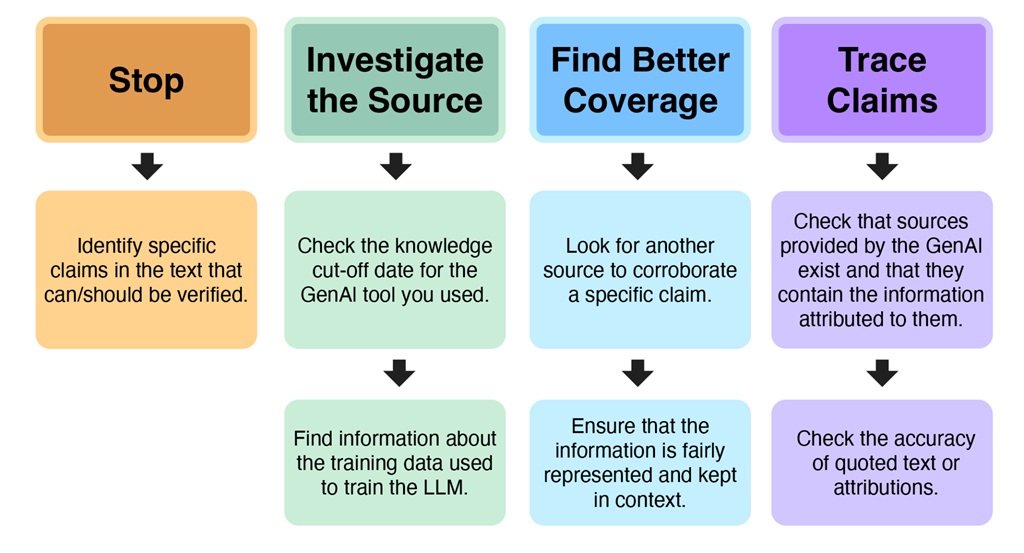
Domains of AI-Awareness for Education by Dani Dilkes is licensed under CC BY-NC-SA 4.0 / A derivative from the original work.
Always use your own knowledge and critical thinking to decide whether the output is useful. Spot-checking and comparing with trusted sources helps protect your academic integrity and ensures your work is based on reliable information.
To learn more about checking information, visit the critical thinking guide.
Make It Yours:
This step is about staying in control of your work. You are the author, and Gen-AI is just a tool you guide.
You should ask yourself:
Have I used Gen-AI to support my ideas and perspectives, not replace them? Does the final product feel like I produced it?
Click here to learn more
Every suggestion from Gen-AI should be checked against your original thinking. Ask: Does this match what I want to say? If it takes you in a new direction, decide whether to follow it or not.
If Gen-AI is allowed in your assessments, its output should help you express your ideas—not do the work for you. Research by Peters and Chin-Yee shows Gen-AI often overgeneralises, especially in summaries. Without clear goals, your work may lose important detail.
Always read Gen-AI output carefully. Replace vague phrases with your own examples and adjust the tone so it sounds like you. Your voice should be present in every decision—what to keep, change, or reject.
Using Gen-AI carelessly can weaken your work. Like a calculator in maths, Gen-AI is useful only when you understand what you are doing. The final product should reflect your thinking, not the tool’s.
Here are some tips on how to keep your unique voice and ideas while using Gen-AI:
Before you start
Define your position first: Write down your main argument, perspective, or creative vision in your own words before using any Gen-AI tool. This gives you something to check against later.
Set clear boundaries: Decide in advance what role the Gen-AI will play. Are you using it to generate initial ideas, refine existing work, or create supporting materials? Knowing this helps you maintain control.
Know your own style: Look at your past work to understand your usual academic or creative style, tone, and point of view. What makes your work unique?
For Text Generation (ChatGPT, Claude, Gemini, etc.)
Start with your draft first: Write your own version, even if it is rough, before asking Gen-AI for help. This keeps your ideas in charge.
Use it as a sounding board, not a writer: Instead of asking “write this for me,” ask “what are the weaknesses in my argument?” or “what perspectives am I missing?”
Prompt with your voice: When asking for suggestions, include phrases like “in a conversational tone” or “for an undergraduate audience” to guide outputs towards your style rather than accepting generic AI voice.
Edit heavily: Treat Gen-AI output as a rough draft. Change sentence structure, replace formal language with your own phrasing, and add personal examples.
Read it aloud: If it does not sound like something you would say in a conversation or presentation, revise it until it does.
For Image Generation (DALL-E, Midjourney, Stable Diffusion, etc.)
Sketch first: Even simple drawings or mood boards help you explain your visual idea before using Gen-AI.
Iterate with intention: When Gen-AI gives you an image, look closely at what matches your idea and what does not. Change your prompts to get closer to your vision.
Combine and modify: Use AI-generated images as elements within a larger composition you control, rather than as final products. Add your own edits, overlays, or context.
Document your creative decisions: Keep notes about why you chose certain elements, colours, or compositions. This helps you explain your artistic choices.
For Code Generation (GitHub Copilot, ChatGPT for coding, etc.)
Understand before implementing: Never use code you do not understand. Research unfamiliar functions and logic patterns.
Write the structure yourself: Plan your functions, classes, and layout before asking Gen-AI for help with details.
Refactor to your standards: Gen-AI code often uses generic styles. Change it to match your own naming, comments, and preferences.
Test and validate: Run the code, identify issues, and fix them yourself. Understanding why something works (or fails) keeps you in control.
For Data Analysis and Visualisation
Ask questions first: Decide what you want to learn from the data before using Gen-AI. Do not let it choose what is interesting.
Verify interpretations: When Gen-AI suggests patterns or insights, check them against the raw data and your own knowledge. Do they make sense?
Create your own visualisations: Use Gen-AI results as a starting point, but design your own charts and graphs to match your message and audience.
Provide context: Gen-AI does not know your subject, your audience, or your goals. You must explain the findings using your own understanding.
After Using GenAI
Compare with your original vision: Return to what you wrote down at the start. Does the final product still reflect your core ideas and perspective?
Remove AI-isms: Delete phrases like “it is important to note,” “in conclusion,” “delve into,” or “multifaceted”—these are telltale signs of generic AI voice.
Add specific examples: Replace vague Gen-AI content with your own experiences, observations, or research.
Check for overgeneralisation: Gen-AI tends to overgeneralise. Add nuance, acknowledge limitations, and include other viewpoints or exceptions.
Get feedback: Ask someone you trust if the work sounds like you. If they say it does not, revise it.
Reflect on the process: What did you learn? What decisions did you make? If you cannot explain your decisions, Gen-AI may have taken over too much.
Challenge: Complete the Gen-AI CheckPoint
Remember This checkpoint provides a quick framework to help you stay in the driver’s seat while using Gen-AI. You are responsible for the quality, accuracy, and integrity of your work—Gen-AI is a tool to assist you, not replace your critical thinking and judgment. Unpack
Unpacking Gen-AI Many people already have opinions about Gen-AI, and these opinions can sometimes conflict. A person might want to use it but feel uneasy about how it is created. They might see classmates using it and wonder if they are disadvantaging themselves by avoiding it, or gaining an unfair advantage by using it. They might think ethical concerns are exaggerated, or believe they are serious enough to avoid the technology, or change their view from day to day.
This guide will not resolve those tensions. The technology is too new, too connected to existing inequalities, and changing too quickly for simple answers.
However, the questions in this section do have answers—your answers, even if those answers change over time.
Critical questions Gen-AI is part of a much larger system. It is not just a tool for learning or working—it is also connected to global industries, environmental concerns, and economic systems that often benefit large companies in wealthy countries.
Many Gen-AI tools are built using loopholes in copyright law, personal data from free users, and labour from underpaid or unprotected workers. These practices raise serious ethical questions about how Gen-AI is developed and who profits from it.
As a user, you should think carefully about how your use of Gen-AI fits into this bigger picture. Using Gen-AI without considering these issues can affect your learning, your values, and your impact on the world.
Skill Development
Using Gen-AI to do the work for you might mean missing out on learning important skills. If you rely on Gen-AI to write, solve problems, or analyse ideas, you may not get the chance to practise those skills yourself.
Ask yourself: Would using Gen-AI for this task stop me from learning or building a skill I need? </div>
Environmental Impact
Gen-AI systems use large amounts of energy and resources to train and operate. This contributes to environmental damage, including large amounts of water usage, carbon emissions and electronic waste.
Ask yourself: Does the environmental impact of Gen-AI affect my decision to use it? Does it change how often I use it or what I use it for? Are some tools or tasks better or worse for the environment? </div>
Labour Practices
Many Gen-AI systems are built and maintained by workers who may be underpaid, overworked, or exposed to harmful content without proper support. These workers are often located in countries with fewer protections, while profits go to large companies in wealthier nations.
Ask yourself: Does my need or interest in using Gen-AI outweigh the ethical concerns about how it was made? Do I understand the impact of using this tool? If I choose to use Gen-AI, how can I support fairer and more ethical development in the future? </div>
Corporate and Social Responsibility
The companies that create Gen-AI tools have their own goals, values, and business practices. Some may use your data in ways you do not agree with, or profit from industries that do not align with your values or Curtin’s values.
Ask yourself: Do I agree with the goals and business practices of this company? Where do they get their training data? Which companies are building Gen-AI models? Which companies are using these models in their tools? Who profits from these tools? How else do these companies make money? </div>
Future impact Have a look at this video, which features Curtin University academics and professionals discussing the future of Gen-AI and other artificial technologies, including developments beyond large language models.
AI is not likely to disappear. In fact, Stanford’s 2025 AI Index Report shows that AI is becoming a normal part of everyday life, with private investment reaching almost $34 billion (USD) in 2024. It is no surprise that Gen-AI is becoming more efficient, affordable, and accessible.
Because of this, it is important to understand how AI and Gen-AI can be used meaningfully. Yet, being aware of Gen-AI does not mean a person must use it. Someone may choose to object to using it after learning about it, but it is not wise to ignore it completely.
From an employability perspective, keeping knowledge and skills up to date matters. Understanding Gen-AI is increasingly expected in the workplace. However, there is a difference between simply knowing how to use Gen-AI to finish tasks and knowing how to use it strategically.
As a student, it is important to think about what skills an assessment is designed to help you practise. You need to recognise when you should build these skills yourself and when you have enough understanding to let Gen-AI complete a task that you then review. Regularly checking in with your unit coordinator about how you are using AI can help you work out whether your approach aligns with learning outcomes.
For example, imagine you are studying to become a computer programmer. You begin using Gen-AI to write code because many experts in the field use the latest Gen-AI models. You include this code in assessments and graduate successfully.
Later, you find a job and continue relying on Gen-AI to generate code. However, you struggle with the pace of work because it takes a long time to find bugs and improve the code. You realise that by not developing your coding skills during your studies, you now have to catch up in your career. </div>
What went wrong? You used Gen-AI to generate initial code but rarely attempted to write solutions independently first. This meant you missed opportunities to develop problem-solving approaches and build intuition for code structure. The issue was not using Gen-AI itself, but using it in an unbalanced way without thinking ahead. As Alex Jenkins, Director of the WA Data Science Innovation Hub, stated in the video, many people are using Gen-AI to improve their coding skills.
This example shows the importance of balancing skill development for your future. If you had spent equal time learning to write and edit code yourself, instead of relying entirely on Gen-AI for the writing, you might have faced fewer challenges later because you would have had a stronger understanding of the skill. It might feel inefficient to write code slowly when Gen-AI can do it instantly, but that is where you build the intuition that makes you faster later.
Beyond balancing current skill development, you should also consider how Gen-AI might reshape your field entirely. Gen-AI is already good at generating code like Python and JavaScript, which means writing code can be done much faster. What other skills might become important to fill this gap? Perhaps knowledge of user design or product management. This is why staying informed about trends in your field is valuable, even before starting your career.
The future with Gen-AI will look different, but with many people working to guide it in positive directions, the future can be bright.
Challenge: Between a rock and a hAIrd place Where do you currently stand on Gen-AI use?
Many people already have opinions about Gen-AI, and these opinions can sometimes conflict. Before exploring the complexities further, consider where you are right now in your thinking.
Remember that you are not alone in trying to understand how this new technology has and will affect modern life. By staying informed and using Gen-AI with a critical mindset, you will be better equipped to address whatever comes.
Upskill
Upskilling with Gen-AI
This section is all about practice. If you don’t have a tool of choice yet, review the common tool chart to choose what Gen-AI tool or tools you’d like to try out. Remember to always keep your privacy in mind before deciding to engage with a tool.
Then, check out different styles of prompting to help you achieve the desired output in the effective prompting section. You will also find a prompt library with prompts specifically designed to elicit meaningful and appropriate feedback on your academic writing.
Common Gen-AI tools AI tools are designed for specific purposes, such as productivity or research, and it is important to understand their limits. Staying informed, testing different tools, and being adaptable helps you use them effectively as technology evolves.
This table lists examples of Gen-AI tools for creativity, productivity, and research. It is not a complete list—many other tools exist with different features. These examples are a starting point for exploring what is available. Inclusion does not mean Curtin recommends or endorses any tool.
| Gen-AI tool | Marketed for | Cost |
|---|---|---|
| ChatGPT (OpenAI) | Writing, coding, image generation, document processing, voice interactions, GPT assistants | $-$$$ |
| Claude (Anthropic) | Writing, understand images and uploaded documents, create files, interactive artifacts, execute code | $$-$$$ |
| Perplexity AI | Academic-style answers with citations, research support, summarising sources | $$-$$$ |
| Elicit | Research support for sciences, summarise academic papers, review literature | $-$$$ |
| Scite | Find, analyse, and cite academic literature, evaluate research claims | $-$$$ |
| Consensus | Natural language answers to research questions from peer-reviewed papers | $-$$$ |
| ResearchRabbit | Visualising research connections, tracking academic papers, discovering related work | $ |
| Adobe Firefly | Image and text effect generation, integrated with Adobe apps | $-$$$ |
| Midjourney | High-quality AI-generated digital art and imagery from text prompts | $-$$$ |
| Nano Banana | Emerging AI tool focused on image creation, style transfer, and experimental visual effects | $-$$ |
| Jasper AI | Marketing content, copywriting, blog and social media post generation | $$-$$$ |
| GitHub Copilot | AI code completion, code suggestions, programming help | $-$$ |
Note: Many providers offer free trials or limited free versions. For the latest and most accurate pricing, please refer to the official websites of each tool. Last updated December 2025.
Effective prompts Getting useful results from Gen-AI tools depends on giving a clear and detailed message. This message is called a prompt. Prompt engineering means writing a message that helps the Gen-AI tool give the best answer. Sometimes, you will chat with the Gen-AI and do not need a structured prompt. But if you want a specific format or more detail, you will need to use prompt engineering.
There are several prompt engineering techniques that can help you get the most effective results:
Few-shot prompting
Few-shot prompting gives the Gen-AI tool examples so it understands the task and what you expect. The Gen-AI tool forms its output around the examples and instructions you provide.
By providing two or more examples, the tool can recognise patterns and provide more accurate responses.
Example prompt Classify the following symptoms into one of the categories: Common Cold, Flu, or Allergies. Here are some examples:
Examples:
- “I have a runny nose, sneezing, and itchy eyes.” = Allergies
- “I’ve had a fever, body aches, and chills for two days.” = Flu
- “My throat is sore, and I have a mild cough but no fever.” = Common Cold
New input: “I have a fever, fatigue, and a headache.”
Expected Gen-AI response:
Based on your new input, here’s the classification:
“I have a fever, fatigue, and a headache.” = Flu
These symptoms are commonly associated with the flu, especially when they occur together.
**When to use this technique:** Use this method when you have different types of information that need to be organised into categories you choose.Chain of thought prompting
Chain of Thought (COT) prompting encourages the Gen-AI tool to explain its reasoning step by step before giving an answer. This method helps you see how the tool reached its conclusion.
Add the phrase “Let’s think step by step, including explanations” to your input. The tool will then break down its response and include details about the process.
Example prompt Balance the following chemical equation. Let’s work it through step-by-step, including explanations about why each step is done.
Balance the reaction: Al + HCl → AlCl3 + H2
**When to use this technique:** Use this method when you want to understand the reasoning behind an answer or when solving complex problems, like maths or science problems, decision-making, or logical analysis, that need clear steps.</div>
Prompt chaining
Prompt chaining encourages the Gen-AI tool to break down complex tasks into a series of smaller, easier prompts. After the first prompt, each new prompt adds more details to help the final result meet your goal. It works like an ongoing conversation with the tool.
Example prompt Scenario: Create a comprehensive semester schedule that includes assignment due dates, class schedules, holidays, personal events, and work shifts.
- Prompt #1: Here is a list of key dates, class times, and events for the semester. Organise them into categories: Classes, Assignments, Holidays, Personal Events, and Work Shifts. INFORMATION: [Include details and dates for each]
- Prompt #2: Now, create a weekly schedule with time blocks, filling in classes, work shifts, holidays, and personal events. Make sure to leave time for study and personal activities.
- Prompt #3: Place the assignment due dates, holidays, and personal events onto the calendar, making sure to leave time for preparation and recovery.
- Prompt #4: Now, identify any gaps in your schedule where you can allocate study and revision time for exams and assignments.
</div>
CARE formula
CARE stands for Context-Action-Response-Example. When you write a prompt, you will include details under each of these headings to help Gen-AI understand what you need.
- CONTEXT: Explain the situation. Include your role, how experienced you are, where you are, and what project or task you are working on.
- ASK: Say clearly what you want Gen-AI to do. Include the role you want it to take, what kind of output you need, and the steps it should follow.
- RULES: Give any limits or instructions. This might include how long the response should be, what writing style to use, or what format you want.
- EXAMPLE: Share examples of what you want or do not want Gen-AI to produce. You can include good and bad examples. Sometimes, you might not need to give examples.
Example prompt
CONTEXT
I am a medical student at university and need to increase my experience interacting with patients.
ASK
Please act as a patient who has arrived at a GP clinic presenting with an illness. You will decide on this illness before our conversation but will not tell me what this is. We will roleplay a conversation mimicking a doctor’s appointment, where I will ask you questions about your symptoms.
RULES
Please provide all answers in a chat format as though we are having a conversation. Use an informal tone. You will not tell me whether I am correct until I provide a diagnosis following the phrase “OFFICIAL DIAGNOSIS”.
Let me know if you have understood this. Do you have any additional pieces of context or rules that will benefit my practice here? Let me know when you are ready, and we can begin.
**When to use this technique:** Use this method for roleplay situations, when you want Gen-AI to act like a tutor who explains difficult ideas or problems, etc.</div> </div>
Prompt library This prompt library is designed to help you use Gen-AI tools to get feedback on your academic writing. It is not for generating or editing your content. The focus is on improving writing quality, not completing the entire assessment process.
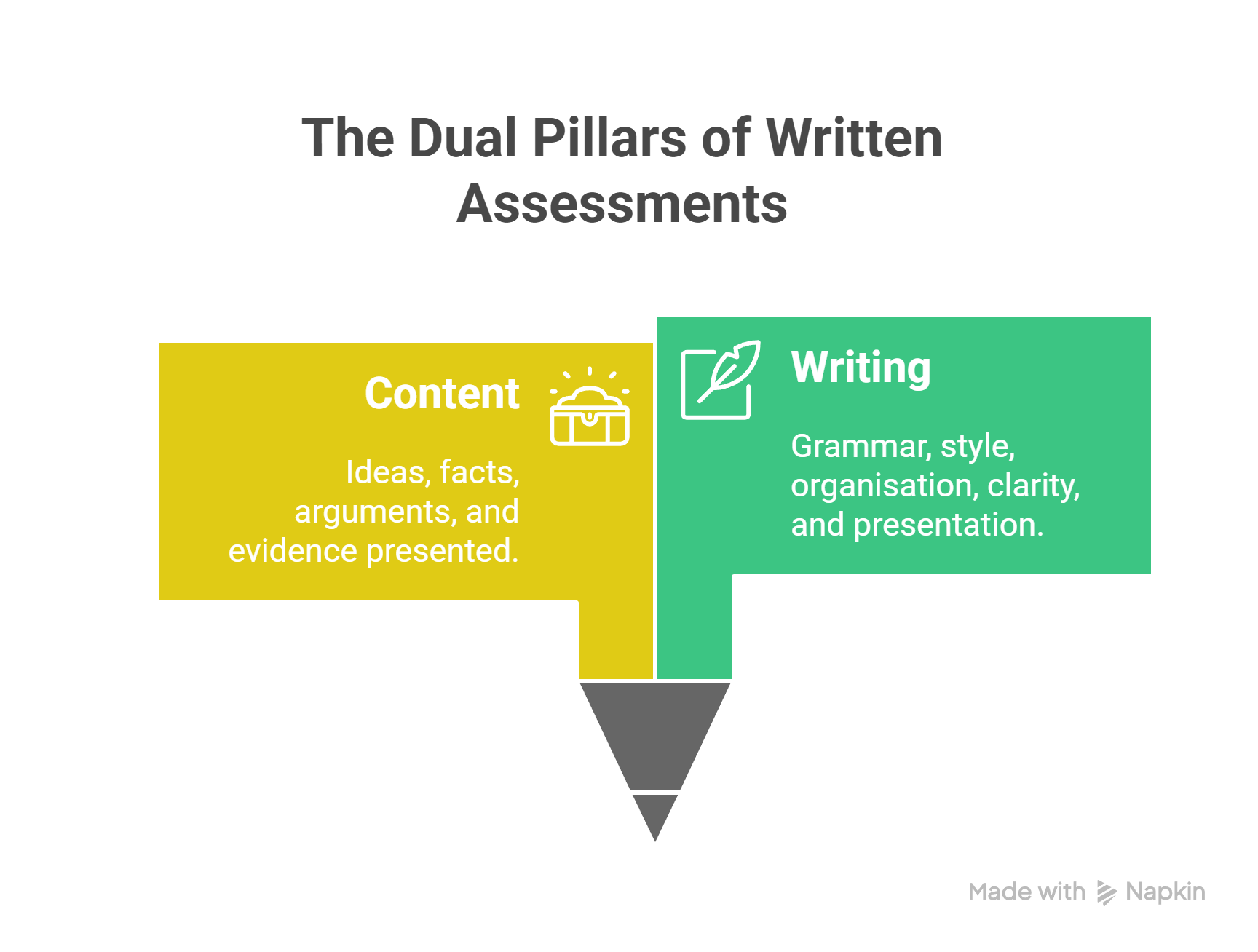
In academic writing, content and writing are connected but different.
- Content is your ideas, arguments, and evidence.
- Writing is how you present those ideas through grammar, style, organisation, and clarity.
A strong paper needs both, but they are separate skills that you can improve individually.
Before using this library, read the Use section of this guide. It explains how to use Gen-AI responsibly and avoid turning it into a shortcut.
How to use the prompt library The prompts in this library should only be used after you have written a draft and only for feedback on writing, not for generating or editing content.
For more help with academic writing, visit the Academic Writing Guide.
Get started by trying out one of the options:
- Copy and paste a category of prompts based on what you want to improve in your text into your chosen Gen-AI tool; gather all feedback in a single chat
- Enter only the general feedback prompts in your chosen Gen-AI tool
Be sure to replace [text between brackets] with information relevant to you.
If the quality of responses decreases during the chat, start a new chat and give a short summary of the previous conversation. </div>
Initial testing with free accounts of common Gen-AI tools showed that Claude Sonnet 4.5 provided the best quality responses and adhered to the prompt instructions well, followed by ChatGPT 5.0.
Make sure you understand how your data (everything you enter or is allowed to be accessed) will be used or stored by reviewing the Gen-AI tool’s privacy policy before getting started.
Gen-AI technology can produce unpredictable results. It is your responsibility to learn about these tools and use them according to Curtin’s Academic Integrity policy and your unit coordinator’s permissions.
General feedback
-
(1) Provide an overall assessment of my [insert assessment type] for a [year level + degree level] unit, addressing four areas: referencing consistency, language clarity and precision, technical details (spelling/grammar/sentence structure), and document structure/flow. (2) For each area, provide balanced feedback on strengths and areas for improvement. (3) Use Australian English at a Year 10 high school level to explain feedback. (4) Do not make the corrections for me or change the content; focus only on how my writing can be improved. (5) Structure feedback logically and progressively using headings and dot point lists. (6) Do not make suggestions at the end for follow-up actions for the entire conversation. [Copy and paste your text here]
-
(1) Bold or highlight all the parts of my text (including the reference list if there is one) that have been flagged in the feedback you provided as incorrect or needing improvement. (2) Briefly label what each issue is in italics directly after. (3) Keep text formatted as it was in the original and provide the bolded-and-labelled version in proper paragraph form as originally provided. (4) Do not make corrections or change anything I have written.
-
(1) Break down the following feedback further: [copy and paste feedback you want more clarification on]. (2) Share a corrected example of this type of issue that is not from my writing. (3) Use Australian English at a Year 10 high school level to explain feedback. (4) Do not make the corrections for me or change the content; focus only on how my writing can be improved. (5) Structure feedback logically and progressively using headings and dot point lists.
See an example of these prompts used in the free version of Claude.
Structure
-
(1) Evaluate the organisational structure of my [insert assessment type] for a [year level + degree level] unit by examining: my introduction, my body sections, my conclusion, and transitions between sections. (2) Provide balanced feedback only on structure, my introduction, my body sections, my conclusion, and transitions between sections. (2) Provide balanced feedback only on structure based on what works well and where improvements are needed. (3) Use Australian English at a Year 10 high school level to explain feedback. (4) Do not make the corrections for me or change the content; focus only on how my writing can be improved. (5) Structure feedback logically and progressively using headings and dot point lists. (6) Do not make suggestions at the end for follow-up actions for the entire conversation. [Copy and paste your text here]
-
(1) Bold or highlight all the parts of my text (including the reference list if there is one) that have been flagged in the feedback you provided as incorrect or needing improvement. (2) Briefly label what each issue is in italics directly after. (3) Keep text formatted as it was in the original and provide the bolded-and-labelled version in proper paragraph form as originally provided. (4) Do not make corrections or change anything I have written.
-
(1) Break down the following feedback further: [copy and paste feedback you want more clarification on]. (2) Share a corrected example of this type of issue that is not from my writing. (3) Use Australian English at a Year 10 high school level to explain feedback. (4) Do not make the corrections for me or change the content; focus only on how my writing can be improved. (5) Structure feedback logically and progressively using headings and dot point lists.
See an example of these prompts used in the free version of Claude
Language
-
(1) Review the technical accuracy of my [insert assessment type] for a [year level + degree level] unit by examining spelling, grammar, sentence structure and clarity, and punctuation usage. (2) Provide balanced feedback on what demonstrates attention to detail and what needs review. (3) Use Australian English at a Year 10 high school level to explain feedback. (4) Do not make the corrections for me or change the content; focus only on how my writing can be improved. (5) Structure feedback logically and progressively using headings and dot point lists. (6) Do not make suggestions at the end for follow-up actions for the entire conversation.
[Copy and paste your text here] -
(1) Bold or highlight all the parts of my text (including the reference list if there is one) that have been flagged in the feedback you provided as incorrect or needing improvement. (2) Briefly label what each issue is in italics directly after. (3) Keep text formatted as it was in the original and provide the bolded-and-labelled version in proper paragraph form as originally provided. (4) Do not make corrections or change anything I have written.
-
(1) Break down the following feedback further: [copy and paste feedback you want more clarification on]. (2) Share a corrected example of this type of issue that is not from my writing. (3) Use Australian English at a Year 10 high school level to explain feedback. (4) Do not make the corrections for me or change the content; focus only on how my writing can be improved. (5) Structure feedback logically and progressively using headings and dot point lists.
See an example of these prompts used in the free version of Claude
Spelling and Grammar
-
(1) Review the technical accuracy of my [insert assessment type] for a [year level + degree level] unit by examining spelling, grammar, sentence structure and clarity, and punctuation usage. (2) Provide balanced feedback on what demonstrates attention to detail and what needs review. (3) Use Australian English at a Year 10 high school level to explain feedback. (4) Do not make the corrections for me or change the content; focus only on how my writing can be improved. (5) Structure feedback logically and progressively using headings and dot point lists. (6) Do not make suggestions at the end for follow-up actions for the entire conversation.
[Copy and paste your text here] -
(1) Bold or highlight all the parts of my text (including the reference list if there is one) that have been flagged in the feedback you provided as incorrect or needing improvement. (2) Briefly label what each issue is in italics directly after. (3) Keep text formatted as it was in the original and provide the bolded-and-labelled version in proper paragraph form as originally provided. (4) Do not make corrections or change anything I have written.
-
(1) Break down the following feedback further: [copy and paste feedback you want more clarification on]. (2) Share a corrected example of this type of issue that is not from my writing. (3) Use Australian English at a Year 10 high school level to explain feedback. (4) Do not make the corrections for me or change the content; focus only on how my writing can be improved. (5) Structure feedback logically and progressively using headings and dot point lists.
See an example of these prompts used in the free version of Claude
Use of sources
(1) Evaluate my referencing practices of my [insert assessment type] for a [year level + degree level] unit using [insert referencing style if known] by examining consistency of referencing throughout, presence of in-text citations, completeness of the reference list, and formatting accuracy (capitalisation, punctuation, italicisation of titles). (2) Provide balanced feedback only on referencing based on what is done correctly and what needs review for accuracy and consistency. (3) Use Australian English at a Year 10 high school level to explain feedback. (4) Do not make the corrections for me or change the content; focus only on how my writing can be improved. (5) Structure feedback logically and progressively using headings and dot point lists. (6) Do not make suggestions at the end for follow-up actions for the entire conversation.
[Copy and paste your text here]
(1) Bold or highlight all the parts of my text (including the reference list if there is one) that have been flagged in the feedback you provided as incorrect or needing improvement. (2) Briefly label what each issue is in italics directly after. (3) Keep text formatted as it was in the original and provide the bolded-and-labelled version in proper paragraph form as originally provided. (4) Do not make corrections or change anything I have written.
(1) Break down the following feedback further: [copy and paste feedback you want more clarification on]. (2) Share a corrected example of this type of issue that is not from my writing. (3) Use Australian English at a Year 10 high school level to explain feedback. (4) Do not make the corrections for me or change the content; focus only on how my writing can be improved. (5) Structure feedback logically and progressively using headings and dot point lists.
See an example of these prompts used in the free version of Claude
Critical thinking
Choose the first instruction of the prompt based on your assessment type (or closest equivalent), then add it to the rest of the prompt before entering it into the Gen-AI tool.
Annotated bibliography
(1) Analyse the critical thinking in my annotated bibliography by identifying evidence of scholarly evaluation, synthesis across sources, pattern recognition in the literature, comparative analysis between works, evidence-based source selection, and engagement with multiple scholarly perspectives.
Case study
(1) Analyse the critical thinking in my case study by identifying evidence of in-depth analysis, connections between theoretical concepts and real-world application, identification of key patterns or themes, comparison of alternative approaches, evidence-based conclusions, and consideration of multiple stakeholder viewpoints.
Essay
(1) Analyse the critical thinking in my essay by identifying evidence of logical reasoning, conceptual connections, thematic patterns, comparative analysis, evidence-based argumentation, and engagement with multiple perspectives.
Literature review
(1) Analyse the critical thinking in my literature review by identifying evidence of critical evaluation of research, synthesis of connections across studies, identification of gaps or trends in the literature, comparative analysis of methodologies or findings, evidence-based conclusions, and representation of diverse scholarly viewpoints.
Report
(1) Analyse the critical thinking in my report by identifying evidence of systematic analysis, logical connections between findings, pattern identification in data, comparative evaluation of options or outcomes, evidence-based recommendations, and consideration of multiple perspectives.
Reflective writing
(1) Analyse the critical thinking in my reflective writing by identifying evidence of self-analysis, connections between experience and theory, recognition of developmental patterns, comparison between initial and evolved perspectives, evidence-based insights, and acknowledgement of alternative viewpoints.
Other
(1) Analyse the critical thinking in my [discussion post/blog post/portfolio/creative assessment/group project/presentation] by identifying evidence of analytical reasoning, conceptual connections, thematic patterns, comparative perspectives, evidence-based contributions, and engagement with multiple viewpoints.
-
…(2) Provide balanced feedback only on critical thinking based on demonstrated skills and specific suggestions for demonstrating greater depth. (3) Use Australian English at a Year 10 high school level to explain feedback. (4) Do not make the corrections for me or change the content; focus only on how my writing can be improved. (5) Structure feedback logically and progressively using headings and dot point lists. (6) Do not make suggestions at the end for follow-up actions for the entire conversation.
[Copy and paste your text here] -
(1) Bold or highlight all the parts of my text (including the reference list if there is one) that have been flagged as incorrect or needing improvement. (2) Briefly label what each issue is in italics directly after. (3) Keep text formatted as it was in the original and provide the bolded-and-labelled version in proper paragraph form as originally provided. (4) Do not make corrections or change anything I have written.
-
(1) Break down the following feedback further: [copy and paste feedback you want more clarification on]. (2) Share an improved example of this type of issue that is not from my writing. (3) Use Australian English at a Year 10 high school level to explain feedback. (4) Do not make the corrections for me or change the content; focus only on how my writing can be improved. (5) Structure feedback logically and progressively using headings and dot point lists.
See an example of these prompts used in the free version of Claude
Please note: This prompt library is part of on ongoing project from Curtin Library and was last updated December 2025.Declare and Reference
Declaring and referencing Gen-AI
If you use a Generative AI (Gen-AI) tool, such as ChatGPT, Claude, or Copilot, when completing an assessment, it is recommended to declare your use. Additionally, if you have used Gen-AI to create content that you include in your work, you must reference this use as a source of information.
Referencing is a standardised way of acknowledging sources such as books, articles, and websites to show that your work is based on credible evidence. Gen-AI must be cited if used as an information source. This is required in the same way as any other information you include in your work that comes from an external source.
It is important to understand that AI-generated content is considered a non-recoverable source. This means that the content produced is usually not accessible to anyone other than the person who generated it. Unless the Gen-AI tool provides a shareable link to the chat, other people cannot be directed to the exact location where the content was created. This makes it difficult to verify claims in the same way as traditional sources.
Gen-AI tools are also not considered scholarly sources at this time. Their responses are created from large training datasets, and the original source of the information is often unknown. For this reason, Gen-AI outputs should be used with care in academic work.
Read through the instructions below on declaring and referencing Gen-AI use and practice correctly declaring your use with the challenge, Terms of Engagement
How to declare and reference Gen-AI use
Coursework students may be given permission to use content created with a Gen-AI tool to support assessment tasks or in the final product.
Higher Degree by Research students should discuss with their supervisors whether the use of Gen-AI is appropriate for their research and for writing their thesis.
If you are allowed to use Gen-AI in your work, it is good practice to include:
-
A written declaration
You should follow your Unit Coordinator’s instructions or use the Library’s declaration template to clearly explain how Gen-AI supported your work. You may also wish to include the prompts you used as a list or by sharing a link to the chat. -
An in-text citation
This is required if the generated text has been quoted, paraphrased or summarised in your written work. -
A reference list entry
If your referencing style states that an entry is not required for Gen-AI in the reference list, list of works cited, footnote or bibliography, you should follow that advice.
</div>
For more details, see the Gen-AI sections in our referencing guides:
- Referencing Gen-AI in APA 7th
- Referencing Gen-AI using Chicago
- Referencing Gen-AI using Vancouver
- Referencing Gen-AI using AGLC
Tip: The referencing style you are required to use may ask for the date you accessed the Gen-AI tool, as well as the model and version that were used, for example, ChatGPT 5.0 or Claude Sonnet 4.6. For this reason, it is good practice to record these details when you use a Gen-AI tool.
If you do not say that you used Gen-AI, it may be seen as dishonest or unfair. This could be treated as academic misconduct.
Declaration template If you use Gen-AI in your assessment, a declaration can be included, generally after a reference list, to be transparent about how you used it and what it helped you do.
You can copy the template below and change it to suit your needs.
Declaration of Gen-AI use
I acknowledge the use of [AI tool or technology name, hyperlinked] in the preparation and/or writing of my assessment. I have used [insert AI tool] to assist with (delete items from the following list that do not apply):
- Research: I generated an overview of my topic to assist with the research process.
- Idea generation: I generated suggestions on possible topics or angles to explore within my assessment.
- Clarifying: I generated explanations/examples to help me understand confusing or complex topics.
- Structure and organisation: I generated an assessment plan.
- Writing: I generated text which I adapted in my assessment. I have indicated through in-text citations where text has been quoted or paraphrased.
- Other: Please provide a description of how you have used the tool.
I entered the following prompt/s:
or
[Insert link to specific Gen-AI chat]
Challenge: Terms of Engagement
H5P interactive activity About UniSkills
UniSkills was created and is maintained by Curtin University Library. To report issues with UniSkills contact Library Help.
Twemoji icons by Twitter, Inc and other contributors, licensed under a CC-BY 4.0 licence.
Except where otherwise noted, UniSkills content in all it’s forms (website, PDFs etc) are licensed under a Creative Commons Attribution ShareAlike 4.0 International Licence. We ask that you attribute any use of the content as created by Curtin University Library with a link to the Library website.
This license does not extend to other Curtin University and Curtin University Library webpages, or to Curtin branding and trademarks. Curtin University’s copyright information is available on the Curtin website.