
Finding-information-printable-guide-UniSkills.pdf
Finding information
Table of Contents
Introduction
Academic assessments rely on strong evidence from trusted sources. Learning how to find the right information is a key skill you will need at university. There are many helpful tips and methods you can use to find high-quality sources.
What you will learn
- Recognise scholarly sources of information typically used in assessments
- Identify key concepts from an assessment question and create an effective search strategy
- Use different search tools to find information
- Locate specific types of information such as statistics, standards and more.
Test your knowledge
Unsure where to start? Discover your searching strengths and weaknesses.
Not what you're looking for?
I want to:
- Learn how to paraphrase, summarise and synthesise information
- Improve my academic writing skills
- Better understand what my assignment is asking me to do
- Better understand if I have met the marking criteria
Assignment process
Assessments are not always a linear journey, but usually you will have to complete the following steps:
Scholarly sources
Scholarly sources
At university, you will need to use different types of sources for your assessments, particularly scholarly sources. These are carefully researched publications written by experts such as academics and researchers in a specific subject area. Their purpose is to share new research, ideas, and analysis, or to explain current thinking in that field.
In brief, writing assessments at university means using scholarly evidence
- You will need to find scholarly and trustworthy sources
- Common scholarly sources include journal articles, books and book chapters, and reports.
</div>
Journal articles
Journal articles are a type of scholarly source that focus on very specific topics. They are written by experts or researchers and include detailed research and evidence, supported by references to other studies.
Many journal articles are peer-reviewed or refereed. This means other experts in the same field check the article carefully before it is published. They look at how accurate, original, and high-quality the article is to make sure it meets academic standards.
Why use journal articles?
Journal articles can give you:
-
Detailed information on a specific part of a topic
-
The latest research findings (new research is often published in journals first)
-
Definitions of important concepts
-
Statistics and data
-
Lists of references that can help you find more related research.
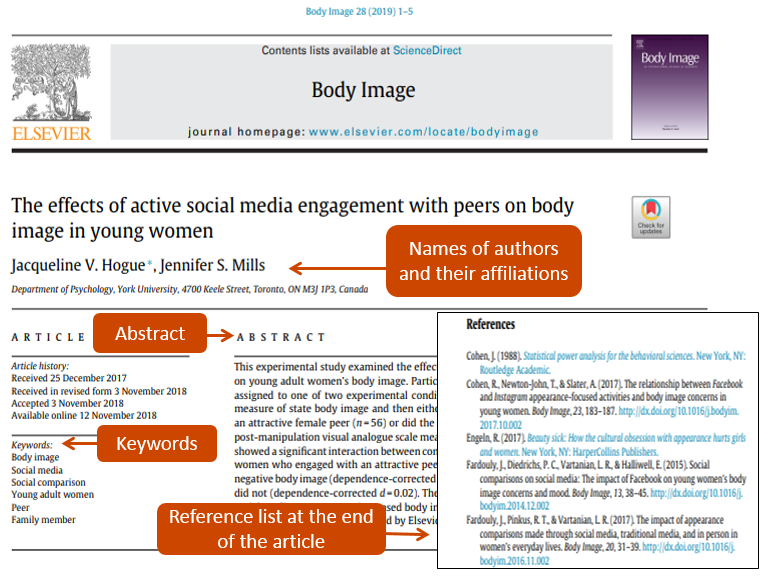
See a journal article example below:
Sample journal article
Books and book chapters
Books are also useful for academic research. They usually give a broad overview of a topic and often go into more detail than other sources. Books are divided into chapters or sections, so you can read only the parts that are most relevant to your assessment. Books can also explain well-known theories and give examples of important research in a subject area.
Why use books?
Books can give you:
-
Definitions of key concepts and terms
-
Detailed information about a topic
-
General background information (helpful if you are new to a topic)
-
Lists of other sources on the topic.
You can find tips on how to access ebooks in Specific resources: ebooks.
Reports
A report is a way of presenting information clearly and formally. Reports usually explain the who, what, where and why of a particular issue. They are often written by government departments, research groups, not-for-profit organisations, companies, and other organisations. Reports help explain the reasons behind decisions or actions.
Be careful when using some reports, especially if they were made for marketing. These might be biased and not fully reliable.
Why use reports?
Reports can give you:
-
Detailed descriptions of an issue, including possible solutions and recommendations
-
Unique information, especially about businesses or organisations
-
Statistics (especially in government reports).
You can find tips on how to locate reports in Specific resources: Reports.
Credible sources
You will also use other credible sources—these are trustworthy and accurate sources like well-known news outlets, trade journals, government and education websites, legal documents, and policy papers. Always check how reliable and accurate these sources are, because the strength of your assessment depends on the quality of the sources you use.
For help finding these types of sources, see Specific resources.
Tip: Your assessment instructions and marking rubric will often tell you what kinds of sources you need to use. </div>Search strategy
A search strategy is an organised way to look for information. It helps you find accurate and relevant information about your topic. A good search strategy includes using keywords and similar terms, combining them with words like AND and OR, and applying filters such as date, type of source, or language.
In brief, creating a search strategy will help you:
- Find useful keywords to begin your search
- Search effectively by using alternative terms, ANDs and ORs, and filters
- Try parallel searches if you are not finding relevant results.
</div>
Identifying keywords
Whether your assessment topic is broad or specific, you will need to find the main concepts in the question. These words or phrases describe your topic and become the keywords (or search terms) you will use to begin your search.
If you need help working out the keywords from your assessment topic, see understanding your question.
Broad question example
Will artificial intelligence ultimately benefit or harm humankind?
Our keywords may be: * Artificial intelligence (AI) * Benefit * Harm * Humans [Brainstorming your topic](https://uniskills.library.curtin.edu.au/academic-writing/getting-started/developing-your-ideas/#brainstorming) can also help you further develop the main concepts and keywords you can use for your search.Specific question example
Explore the ways in which artificial intelligence (AI) has transformed various aspects of human life, from communication and healthcare to industry and entertainment. Discuss both the positive and negative implications of this transformation. Will artificial intelligence ultimately benefit or harm humankind?
Our keywords may be: * Artificial intelligence (AI) * Communication * Healthcare * Industry * Entertainment * Benefit * Harm</div>
</div>
Note: You may need to try different combinations of keywords when searching to find information on different parts of your topic.
Examples
- Artificial intelligence, Communication, Benefit, Harm
- Artificial intelligence, Healthcare, Benefit, Harm
</div>
Searching and reviewing your results Start your search by typing the keywords from your topic into the Library catalogue or a suitable database. These tools often have filters (also called limits) that help you narrow down your results. You can filter by:
- Date (for example, only show items from the last 5 or 10 years)
- Type of resource (such as books or peer-reviewed journal articles)
- Language (for example, English)
Once you get your search results, look through the titles and abstracts (short summaries) of the items. This helps you quickly decide if they are useful for your topic. Sometimes, your first search may not give you the best or most relevant results, even if you used the right keywords.
Expanding and refining your search To improve your search and find more relevant information, here are some useful strategies.
Use alternative terms
Concepts can be described in different ways. For example, the word harm might also be referred to as risk or disadvantage. Think about other words (alternative terms, related terms, or synonyms) that mean the same thing, as these can help you find more results. To find alternative keywords, try these methods:
- Look up your keyword in a thesaurus
- Search for the word or concept in Google or Google Scholar
- Read the abstracts (summaries) of useful articles from your first search to find other keywords, phrases, or subjects.
This table shows some alternative terms we could use for the sample assessment topic:
| Artificial intelligence | Benefits | Harm | Communication |
|---|---|---|---|
| Generative AI Machine learning Gen-AI |
Advantages Opportunities Job efficiency |
Disadvantages Privacy Job loss |
Conversational AI Content creation Virtual assistants |
Combining your search terms
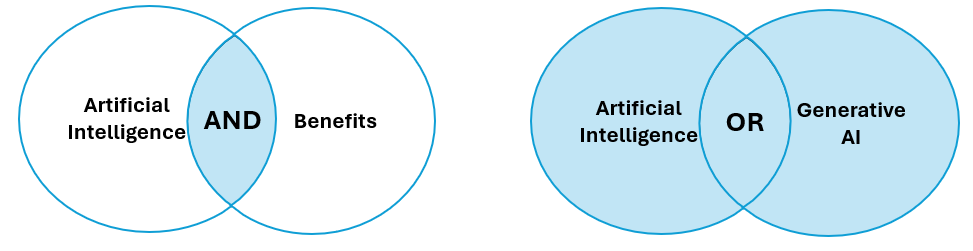
When you search in the Library catalogue or a database, you can combine your keywords using AND and OR to get better results.
-
AND makes your search more specific. It only shows results that include all the concepts you use. For example: Artificial intelligence AND communication will only show articles that mention both artificial intelligence and communication.
-
OR broadens your search. It shows results that include either of the keywords. For example: Artificial intelligence OR generative AI will show articles that mention either artificial intelligence or generative AI.
Other search tips
You can use the tips below when searching in the Library catalogue, databases, or even Google.
Phrase searching Phrase searching helps you find two or more words that appear together in the exact order. This gives you fewer results, but they are usually more relevant. To do this, put double quotation marks around the phrase. For example, “artificial intelligence” will only show results where those two words appear together.
Truncation Truncation helps you search for words with different endings. To use truncation, add an asterisk (*) after the last common part of the word. For example, communicat* will find results that include communicate, communication, communicating and communicated.
Example of a search strategy By using these techniques, you can build a search strategy that works across different databases. You might need to do several searches using different combinations of keywords to find useful sources for each part of your topic.
Examples
-
“artificial intelligence” OR AI AND benefit OR job efficiency AND communication OR content creation
-
“artificial intelligence” OR AI AND harm OR job loss AND communication OR content creation
</div>
Still not finding what you need? If you are getting too many or too few results, or if the results are not relevant, you may need to change your search strategy.
Too many results
Try these tips:
- Add more concepts using AND (for example, artificial intelligence AND benefits AND university AND Australia)
- Use more specific terms (for example, job efficiency or virtual assistants instead of benefits)
- Make sure you are not using OR between different concepts (use AND instead)
- Use filters like resource type, date, subject, or language.
Too few results
Try these tips:
- Check your spelling is correct
- Add more alternative keywords using OR
- Remove some concepts or use broader terms
- Make sure you are not using AND between similar keywords (use OR instead)
- Try searching in a different database.
Parallel searching
If you are still not finding much information, try a parallel search. For example, if you are researching how AI is used by secondary school students and not finding much, you could search for how AI is used by university students instead. You can then use that information in your assessment by comparing the similarities and differences between university and high school students.
Search tools
For your assessments, you will often need to find different kinds of information. Where you search depends on the type of information you are looking for.
In brief, here is a quick guide to where you can search:
- Library catalogue: A good place to start. You can search by title or keywords to find academic sources
- Databases: These allow you to do more detailed searches using advanced search tools
- Google: Useful for finding specific types of information from reliable websites.
</div>
Library catalogue
The Library catalogue is a search tool that helps you find resources in the Library’s collection. It includes:
- Print materials – Books and other items available in the Library
- Online content – Links to digital resources stored in the Library’s databases.
You can do a specific search (for example, the title of your textbook), or a broader topic search using keywords. It works like a regular search engine but focuses on academic and library resources.
Watch this short video about searching in the Library catalogue.
Library databases
Library databases are online collections of academic resources. You can search for and access journal articles, ebooks, newspaper articles, theses, videos, and more. These databases have powerful search functions that help you create a more focused and effective search.
Watch this short video to learn more about how to search in a database. It explains how to use techniques like alternative keywords, AND/OR, truncation, and phrase searching to improve your results.
Using Google or another search engine can be a helpful part of your research. You can use it to:
- Find background information about your topic
- Discover useful keywords for your search
- Locate materials that may not be in academic databases, such as reports or publicly available documents
It is important to evaluate any information you find. Check for bias, accuracy, and credibility before using it in your assessment.
Tips for effective Google searching
You can use AND and OR, phrase searching, and truncation in Google, just like in library databases. Here are some extra tips to improve your search:
Search specific websites
Searching with Google can often give you too many results and not all will be useful. To focus your search, you can use the site: command to search only certain types of websites.
For example, if you want government information about measles in Australia, searching for prevalence measles Australia will give you results from newspapers, blogs, and organisations. However, searching for prevalence measles site:gov.au will only show results from Australian government websites.
Website types
- .edu – Educational institutions
- .gov – Government departments or agencies
- .org, .com, .co – Often used for marketing or news sites. These can be useful, but they do not always meet academic standards.
- Country codes – Help you find websites from a specific country (for example, .au for Australia)
Search for specific file types
Some online information can change quickly. Reports and official documents are more stable and are often shared as PDFs. To find these, use the filetype: command.
For example: If you search for jobs of the future, you may get results from websites trying to sell something. But if you search for jobs of the future filetype:pdf, you will find reports and documents that are more likely to be credible.
Specific resources
Searching for specific resources
You can find most of the resources you need for your university assessments by searching the Curtin Library catalogue or using one of our databases. However, some types of resources may need a more focused search. This page gives you tips on where to look for different kinds of information and strategies to make your searches more successful.
Use the menu below to choose the type of resource you want to find or learn more about.
You should always quality-check the information you would like to include in your assessments. See Critical reading for tips on evaluating sources.
</div>
Standards
“Standards are voluntary documents that set out specifications, procedures and guidelines that aim to ensure products, services, and systems are safe, consistent and reliable” (Standards Australia).
Where can I find standards?
The Library provides access to standards via the databases listed below.
-
Intertek Inform provides full-text access to Australian standards.
-
ASTM Standards (Compass) provides access to American Society of Testing and Materials standards.
-
IEEE Xplore provides digital engineering standards, codes, and regulations. Select Standards from the Browse drop-down list to view a list of standards available from IEEE.
-
National Construction Code provides technical requirements for the design, construction and performance of buildings and plumbing systems across Australia. Includes the National Construction Code, Building Code of Australia and Plumbing Code of Australia.
Standard not available? Curtin staff and postgraduate students may request other standards (for example ISO, IEC) through Intertek Inform. Search for the standard, open the record, then click Request Access on the right side. The Library will be notified of the request and investigate access.
Tips for finding standards * Try searching using the full title or the standard number (for example, ASCRM 035:2014). Using just keywords might give you too many results and make it harder to find the right one. * Standards are updated often, so make sure you are using the most recent version. Databases will tell you if a standard is current or if it has been replaced by a newer one. * Some international (ISO) standards have equivalent Australian and New Zealand versions. If you are looking for an ISO standard, try searching for the standard by the number (for example, 9000:2016). You may find an identical version in the database, such as AS/NZS ISO 9000:2016. Downloading standards Many standards are protected by Digital Rights Management (DRM), which limits how the files can be used and shared. This helps make sure users follow copyright laws and licence agreements. To download and open a DRM-protected standard on your computer: 1. Install [Adobe Acrobat Reader](https://get.adobe.com/uk/reader/). You need this program to open the PDF file 2. Search for the standard in the database and click _Download_. Make sure you know where the file is saved (for example, in your Downloads folder) **Important**: Do not try to open the file in your web browser—it will not work properly 3. Go to the folder where the file was saved. Right-click the file and choose “Open with…”, then select Adobe Reader 4. You should now be able to view the standard. Because it is protected by DRM, it is for your personal use only. You are not allowed to email it or share it with others.Case studies
A case study is a research method that closely looks at a person, a group of people, or another small sample to understand a real-life issue or problem in depth. Case studies can:
- Show how certain ideas or concepts work in real situations
- Help explore complicated problems in detail
- Support decision-making and offer useful recommendations.

Tips for searching for case studies
-
Case studies are usually published in academic or professional journals. When searching for them, it helps to use keywords related to the subject area you are researching.
-
Many library databases let you limit your search to case studies. Look for filters such as: document type, publication type or article type.
-
If the database does not have an option to limit to case studies, try adding case study or case studies to your topic search. For example: business ethics AND case study OR case studies.
Where can I find case studies?
Many library databases include case studies. Below are some key databases that cover a range of subjects:
-
CINAHL Ultimate has case studies in nursing and allied health.
-
Business Source Ultimate provides case studies in business.
-
Emerald covers subjects like management, information science, engineering, education, health, and social care. You can limit your search by selecting Case Studies.
-
ProQuest provides case studies in a range of subject areas.
-
WARC database focuses on advertising and marketing. Select Case studies at the top of the page to access the Case Finder.
Conference papers and proceedings
A conference paper is the written version of a presentation given at a conference. It usually shares new research, ideas or developments in a particular field. Conference papers are often collected and published together as a conference proceeding.
Conference papers and proceedings can be published in different ways, which can make them hard to find. They may be published as books, journal articles, special issues or supplements of journals, or as part of a conference series. Some conferences publish abstracts (short summaries) instead of full papers, while others provide papers only to conference attendees. In some cases, conference papers may not be published at all.

Tips for searching for conference papers and proceedings
-
Try searching using the full name of the conference or use a few keywords along with the location and year of the event.
-
If you know the title of a specific paper or the author’s name, you can search for that directly.
-
Many library databases let you limit your search to conference papers. Look for filters like document type, publication type or article type.
-
Unpublished conference papers can be difficult to find because often only the title, author and abstract are published. They may be found on the conference website, on the author’s personal website, or in a university repository. If you cannot find a copy, you can try contacting the author directly and asking whether they can provide the full paper.
Where can I find conference papers and proceedings?
Conference websites may provide access to papers presented at the conference. A Google search can help you locate these websites and any available papers. Conference papers and proceedings can also be found using Google Scholar.
Curtin Library catalogue
To find conference papers or proceedings in the library catalogue, you can limit your search results by selecting Conference Proceedings or Conference Papers under Resource Type.
Library databases
Many library databases include published conference papers and proceedings. Below are some key databases that cover a wide range of subject areas:
-
Scopus is large database that includes summaries and references for peer-reviewed research. It covers areas such as science, technology, medicine, social sciences, arts, and humanities.
-
Web of Science indexes journal articles, conference papers, data sets, and more. It covers subjects in science, social science, arts, and humanities.
-
ProQuest is a large database that covers many types of content, including conference papers.
Datasets
Data is the raw information collected during a study, experiment or survey. It usually needs to be processed or analysed using software to make sense of it.
A dataset is a collection of data that has been organised in a structured way. The records in a dataset can be arranged differently, depending on how you want to access or use the information.

Where can I find datasets?
Finding datasets can take time and may involve searching different sources. Some common places to look include: government websites, data directories, university or institutional repositories, research centre websites or search engines, like Google or Google Scholar.
Key Australian repositories
- Research Data Australia (RDA)
- Dataplace
- data.gov.au
- Australian Data Archive
- CSIRO Data Access Portal
Australian Bureau of Statistics (ABS)/Universities Australia Agreement
Students and staff at Australian universities are able to access a range of data services from the ABS free of charge on a range of topics including the Census of Population and Housing, health, education, business, labour force, Aboriginal and Torres Strait Islander peoples, migrants, crime, disabilities and ageing.
More information including registration and access details are available on the ABS/Universities Australia Agreement page.
Commercial data repositories and registries
International data archives
Using datasets
When research data is meant to be shared and reused, it should have a license that explains how it can be used. If you use a licensed dataset, make sure you follow the rules set out in the license. If the dataset does not have a license, you must contact the data owner (also called the rights holder) to ask for permission before using it.
Drug resources
Drug resources provide information on the identification and prescription of drugs, including information on dosage, side effects, drug interactions, ingredients and more.

Where can I find drug resources?
The library provides access to a range of drug databases and resources to assist you in finding accurate, evidence-based information.
-
Australian Medicines Handbook (AMH) provides a concise, up-to-date source of independent drug information to facilitate effective, rational, safe and economical prescribing and dispensing.
-
AMH Children’s Dosing Companion provides information for prescribing and administering medicines to children from birth to 18 years.
-
MIMS Online contains both abbreviated and full prescribing information, consumer medicine information and product images for pharmaceuticals available in Australia.
-
Australian Injectable Drugs Handbook provides information about the preparation and administration of injectable medicines.
-
Martindale: The Complete Drug Reference is a comprehensive reference resource on drugs and medicines used worldwide. Coverage includes: drug monographs, proprietary preparations, manufacturers and disease treatment reviews.
-
Therapeutic Guidelines contain searchable, peer-reviewed clinical guidelines covering a broad range of topics. It also has drug information and dosing regimens for a range of diseases.
-
British National Formulary (BNF) provides information on the selection, prescribing, dispensing and administration of medicines.
-
Stockley’s Drug Interactions is a source book of drug interactions, their mechanisms, clinical importance and management. Covers interactions between therapeutic drugs, proprietary medicines, herbal medicines, foods, drinks, and drugs of abuse.
Pharmacopoeias
Pharmacopoeias provide standards for pharmaceutical substances and medicinal products used in a country. These legally binding standards are important in regulating the quality of medicines.
Complementary and Integrative Medicine
Complementary and integrative medicine should be considered alongside drug interventions in terms of their efficacy, but also their interactions and toxicities.
ebooks
An ebook (short for electronic book) is a book that you can read on a computer, tablet, phone or other device.

Where can I find ebooks?
The easiest way to locate ebooks is by searching the Library Catalogue.
- Enter keywords from your topic in the search box and then click on the Search button
- On the results page, refine by selecting the Available Online filter in the right side menu
- Then select the Books Resource Type to limit your results to ebooks only.
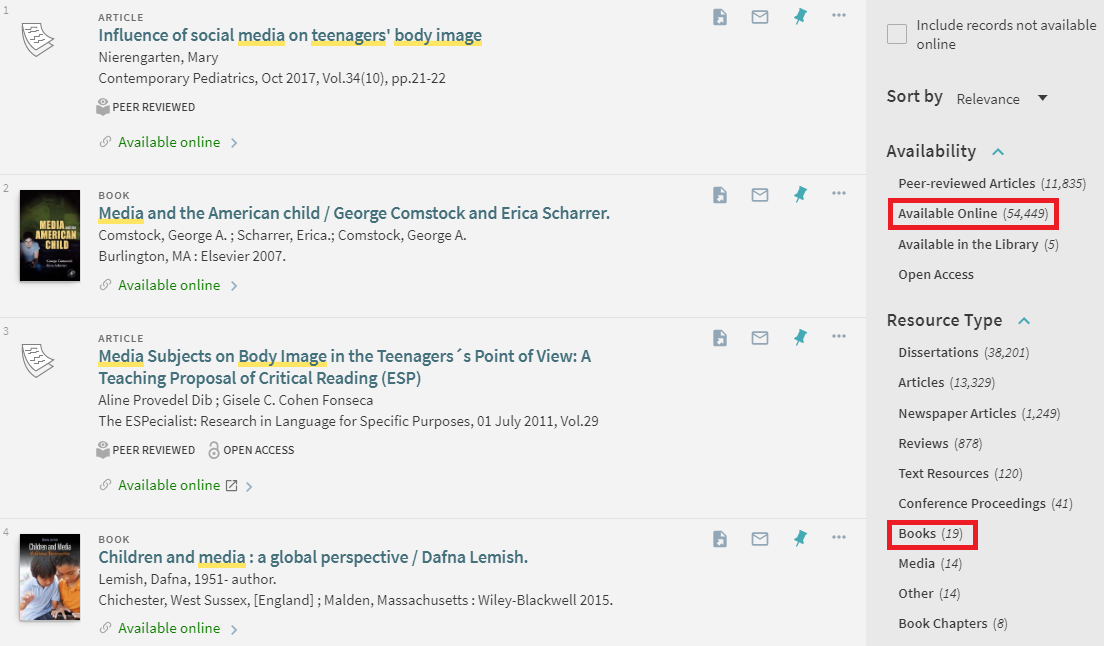
Once you have found a suitable ebook, select Available Online in the item record. This will provide the link to the database where you can read (and sometimes download) the ebook.
How to use ebooks
Ebooks are different from printed books. They do not need to be borrowed using your library card, and you do not have to return them yourself because this happens automatically. However, many ebooks use something called Digital Rights Management (DRM). DRM is a system that controls how you can use the ebook, especially when it comes to downloading or printing.
Reading ebooks online
All ebooks can be read online, as long as a copy is available. However, your session needs to remain active. If you stop interacting with the book, the session may time out, and you will need to search for the book again and reopen it.
Many ebooks now use the EPUB format as it is more accessible and works better with screen readers. EPUBs adjust to the device you are using – the text resizes to fit the screen you are on and they also allow you to change the font style and size, line spacing, and background colour.
Titles in EPUB format have dynamic page numbering, which means the page numbers can change depending on the device you use. For this reason, if you need to cite a quote, it is better to use other identifiers instead of page numbers. Check the relevant referencing guide for more details.
Downloading an ebook for use offline
Some ebooks let you download the whole book or just a chapter so you can read it without an internet connection.
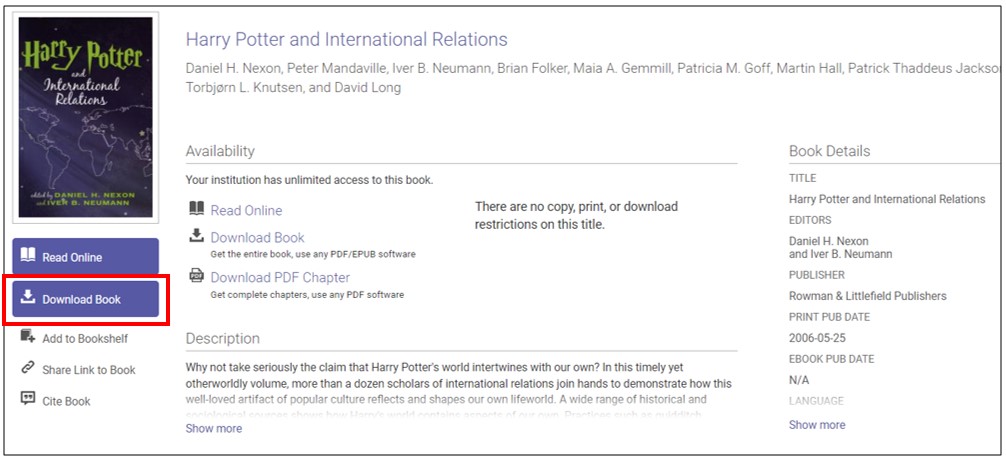
If you download the entire book, you will usually need to install an app. Follow the instructions in the database to get the right software. After downloading an ebook, you usually have between 1 and 14 days to read the book offline. When this time ends, the ebook will expire and you can no longer open it. If you still need it, you will have to download it again.
If you download a chapter or a few pages, the file is usually a PDF. You can open it in a PDF reader or in your web browser.
Printing, saving, highlighting and notemaking
You can print or download chapters from some ebooks, but DRM rules decide how much you are allowed to print or download. Most of the time, you can print, save, or download one chapter of an ebook. This follows the fair dealing rules in the Australian Copyright Act 1968.
Some ebook platforms also let you highlight text or make notes while reading online. These changes are saved, so you can see them next time you open the book. You may need to create an account or log in to use these features.
Why can’t I open an ebook?
DRM controls how many people can access an ebook at the same time, based on the number of licenses available. Just like a physical book that is checked out, some ebooks cannot be opened if someone else is using them.
We know which ebooks are likely to be in high demand and have turned off the download option for those titles. If you try to open an ebook and it will not load, or it only gives you five minutes to read, try again later. Avoid peak times like the middle of the day.
Grey literature
Grey literature includes research and information that is produced by governments, universities, businesses, and other organisations but is not published through commercial publishers. Examples include government reports, policy documents, fact sheets, theses, newsletters, surveys, and interview findings. Grey literature is valuable because it can provide a more complete picture of a topic by including information that may not appear in academic journals, offer up-to-date evidence on new or emerging issues, and serve as an important source of information in fields such as social sciences and government policy.
Tips for searching for grey literature
-
Searching for grey literature can be challenging and often takes more time than searching library databases. Simple searches using your main topic keywords are usually more effective than long, complex search strings.
-
When using a search engine such as Google and Google Scholar, the Advanced Search tool can help you narrow your results by date, language, or region.
-
Try focusing your Google search to particular domains or by file type.
-
Most databases also allow you to limit your search by publication type, document type or source type, which can help you identify and retrieve grey literature sources more efficiently.
Where can I find grey literature?
Websites of relevant organisations
Searching the websites of organisations that work in your research area can be a useful way to find grey literature. These may include government agencies, universities and research institutes, private companies, professional associations, and advocacy groups. Depending on the focus of your topic, the following sources may be useful:
- Australian Policy Online (APO)
- Australian Institute of Health & Welfare
- Australian Government Directory
- International Labour Organization
- Transparency Portal - Australian Government
- United Nations
- World Health Organization
Library databases
Many library databases include a range of publication types beyond journal articles, such as conference papers, policy documents, reports, theses, and government publications.
-
Overton is a multidisciplinary database of policy documents and grey literature. It is useful for finding policy reports, guidelines, government documents, and other grey literature sources.
-
Scopus and Web of Science index conference papers and technical and other reports.
-
ProQuest indexes sources such as dissertations and theses, market reports, government documents, pamphlets and conference papers.
-
Informit (an Australian database) indexes conference papers and many government documents.
Grey literature databases, library catalogues and repositories
-
Specialised databases, such as GreyNet International, index grey literature in a number of subject areas.
-
Trove is a search tool that lets you find information from many Australian libraries, archives and repositories.
-
Institutional repositories, such as CURATE at Curtin, hold digital theses and research papers. Open Access Australasia provides a list of research repositories.
Images
An image is a visual representation of a person, object, or idea. Images can include: paintings, photos, drawings, cartoons and illustrations, diagrams, graphs, computer graphics and plans.
Original images are considered artistic works and are protected by copyright laws.

Ownership and use of images
It is important to follow copyright rules when using images. Just because an image is easy to find online does not mean you can use it freely. Some images can be downloaded and reused under certain conditions. Others, like those from Associated Press, iStock by Getty Images, or Shutterstock, require payment for a license.
Open license, Creative Commons and public domain images
An easy way to avoid copyright issues is to use images that are Open license, Creative Commons (CC) or in the public domain.
An Open license allows people to use and share content with few restrictions. Creative Commons is the most common type of open license. Creative Commons licenses do not remove copyright, instead creators give permission for others to use the content in specific ways. You do not need to ask for permission if you follow the rules of the license. You can learn more about CC licenses on the Creative Commons website.
Public domain images are either no longer protected by copyright or have been made freely available by the copyright owner.
Where can I find Open License, Creative Commons and public domain images?
The following websites provide easily accessible advanced search filters to quickly identify Creative Commons or public domain images:
- flickr
- Openverse
- Wikimedia Commons
- The New York Public Library Digital Collections
- State Library of Victoria copyright-free image search
- Unsplash
Attributing open license, Creative Commons or public domain images
If your work will be shared publicly, you may need to include an attribution statement giving credit to the creator.
To properly attribute a Creative Commons image:
- Name the creator
- Include the title of the work
- Provide the URL where the image is hosted
- Mention the type of license and link to it
- Keep any copyright notice that comes with the image
For help with attribution, see Best practices for attribution on the Creative Commons website.
Referencing images in Curtin University assessments
When using images in your assessments, follow the correct referencing style for your unit. Curtin University provides guides for:
- APA 7th referencing tables and figures
- Chicago 18th Author-Date referencing tables and figures
- Vancouver referencing tables and figures
Legal materials
Legal materials are documents used in legal research and are usually divided into two main types:
-
Primary legal sources are those created by the government, courts, or other official bodies. These include legislation (laws made by parliament) and case law (court decisions)
-
Secondary legal sources are based on primary sources and help explain or analyse the law. These include journal articles, books, legal dictionaries and encyclopedias, commentaries, and newspapers. They are useful for helping you find and understand primary legal sources.

How can I find legislation?
Legislation is made by parliament and includes: Acts (also called Statutes or Acts of Parliament) and subsidiary legislation (also called subordinate or delegated legislation), such as regulations, rules, orders, statutory instruments and by-laws.
You can find Australian legislation on government websites:
- Western Australian Legislation
- Federal Register of Legislation (Commonwealth)
How can I find case law?
Case law (also called court decisions or judgments) records how courts make decisions in legal disputes. In Australia’s common law system, courts can set precedents—legal rules that apply to future cases.
To search for a case, it helps to understand the case citation. For example:
Commonwealth v Tasmania (1983) 158 CLR 1
- Commonwealth v Tasmania - the case name (plaintiff vs defendant)
- 1983 - the year the case was published
- 158 - the volume number of the law report series
- CLR - the abbreviation for the law report series (in this case CLR stands for Commonwealth Law Reports)
- 1 - the page number where the case starts
To find a case:
- Look up the full name of the law report series. Use the Legal abbreviations from Monash University Library
- Search for the name of the Law report series in the Library Catalogue
- Click Available online to access the database that holds the law series
- Search for the case name or citation in the database.
Search legal databases
The following selection of databases include legal materials. For more legal databases, see the Databases A-Z.
-
Lexis+ Australia - Australian primary and secondary legal sources.
-
Westlaw AU - Australian legal journals, case law, commentaries, precedents, encyclopedias and legislation.
-
CCH iKnowConnect - Australian and some international commentary, cases, legislation and news.
-
AustLii - Free access database of Australian Commonwealth and State legal information, including legislation, case law, and journal articles.
Further resources
To learn more about finding legal materials see:
Newspapers and other media sources
News and media sources help people stay informed about current events and issues. They include newspapers, magazines, television news programs, online news websites, and news blogs. Some cover a wide range of topics (e.g. daily newspapers like The Australian or the New York Times), while others focus on specific subjects such as business, politics, or industry news (e.g. Foreign Policy or the Australian Financial Review).
Because news is published quickly, it provides information about events as they happen. This makes media sources useful for finding recent information, images, statistics, quotes, opinions, and other primary source material. They can show how people felt about an issue at a particular time, present different viewpoints on controversial topics, and report new data and statistics as they are released.

Tips for searching for news and media sources
-
News stories are written for the general public, so they use everyday language rather than technical terms or academic jargon. When searching for news, it is often more effective to use simple, commonly used words and phrases rather than specialised subject terminology.
-
If you find an article on a newspaper’s website, try searching for it in the Library’s news databases. The Library may provide access to the full article even if the newspaper’s website requires a subscription or payment.
Where can I find news and media sources?
Google can be an effective starting point for finding news articles and blog posts, particularly when you are exploring a topic or looking for up-to-date information.
Library catalogue
To find news sources in the library catalogue, you can limit your search results by selecting Newspaper Articles or Magazine Articles under Resource Type.
Library databases
-
NewsBank provides access to a wide range of Australian and international news sources including The Australian, Australian Financial Review, Sunday Times, The West Australian and National Indigenous Times.
-
ProQuest provides access to over 2,000 newspapers including 300 Australian newspapers and 63 related specifically to business and economics.
-
West Australian Online (archive digital editions) provides access to archived digital editions of the West Australian newspaper from 2004 onwards. It is updated daily with each edition available the day after publication.
-
TV News (Informit) is an archive of Australian television news, current affairs and selected documentaries from the free-to-air networks. The content is mostly video, however detailed synopses are also provided for each entry.
News websites
-
ABC (Australian Broadcasting Corporation) News provides local, national and international news through television, radio, online news services, and digital platforms.
-
SBS News provides news and current affairs coverage from Australia and around the world, with a focus on diverse perspectives and international issues.
-
BBC News provides news from the United Kingdom, the U.S. and around the world, as well as local and regional news coverage, analysis and current affairs reporting.
-
CNN provides U.S. and international news, with coverage of world events, politics, health, weather, business and entertainment.
Original research articles
Original research articles, also called primary research articles or empirical articles, are journal articles written by researchers to report the results of their own studies. They explain the research question, the methods used to collect and analyse data, and the study’s findings. Before publication, these articles are usually reviewed by other experts in the same field through a process called peer review. This helps ensure that the research is reliable and meets academic standards.
Original research articles are important because they present new knowledge and evidence for the first time. They provide the data and findings that other researchers can use to support, compare, or build on in future studies.
How do I know if an article is original research?
Original research articles:
- Include the following sections: background/literature review, methods/methodology, results, discussion and conclusion
- May mention the type of study conducted (e.g., cohort study, longitudinal study, randomised controlled trial etc.) in the title or abstract (summary) of the article
- May be labelled as Original research, Research article, Original article or something similar.
Some articles may appear to be original research but are actually summaries or analyses of previously published research. Look carefully at the title and abstract for terms such as review, systematic review, meta-analysis, retrospective study, or literature review, as these types of articles are generally considered secondary sources.
Tips for finding original research articles * Add keywords such as _trial or study_ to your topic search, e.g. play or pretend play AND child development AND study or trial * Check the databases for limits such as 'Research articles' or options to filter to particular study designs (e.g. randomised controlled trials) Where can I find original research articles? [Databases](https://databases.library.curtin.edu.au/) are a great source for journal articles on a wide range of topic areas. Below are a selection which are useful for finding original articles. * [Science Direct](https://go.openathens.net/redirector/curtin.edu.au?url=https%3A%2F%2Fwww.sciencedirect.com) - You can refine to _Research articles_ under _Article type_ on the search results page. Note that some systematic reviews may be included so check the abstract for further details about the type of research conducted. * [ProQuest](https://go.openathens.net/redirector/curtin.edu.au?url=https%3A%2F%2Fsearch.proquest.com%2Fadvanced%3Faccountid%3D10382) - Add the term _trial or study_ to your topic search. Check the abstract for further details about the type of research conducted as review articles may be included in the results. * [PsycINFO](https://go.openathens.net/redirector/curtin.edu.au?url=https%3A%2F%2Fovidsp.ovid.com%2Fovidweb.cgi%3FT%3DJS%26MODE%3Deasy%26SYNTAX%3DN%26PAGE%3Dmain%26NEWS%3Dn%26DBC%3Dy%26D%3Dpsya%2Cpsyf%2Cpsyh%2Cpsy1) - Perform a search for your topic. Once results are returned, click _Additional Limits_. Under _Methodology_, select relevant study types e.g., Clinical trial, Empirical study, Field study, Qualitative study, Quantitative study… and click _Limit a Search_.Patents
A patent is a legal right that gives a person or organisation exclusive control over a new invention, such as a product, process, method, or substance. This means other people cannot make, use, or sell the invention without permission for a set period of time. Patents include detailed information about how the invention works and are often the first public source of information about new inventions. They can help you understand what has already been developed and may prevent you from spending time and resources researching something that already exists.

Where can I find patents?
In most countries, patents are issued by a government agency responsible for intellectual property. Patent records are usually available through the agency’s official website, where you can search for and view patent applications and granted patents. Some useful search tools for finding patents include:
-
IP Australia administers Intellectual Property issues in Australia, and using their website, you can search for patents, trademarks and designs.
-
United States Patent and Trademark Office (USPTO) allows free searching for USA granted patents. It contains the full text and drawings of USA patents since 1976.
-
Espacenet Patent Search contains patent applications issued by both the European Patent Office (EPO) and the World Intellectual Property Organisation (WIPO).
-
PATENTSCOPE provides access to international Patent Cooperation Treaty (PCT) applications in full text format on the day of publication, as well as to patent documents of participating national and regional patent offices. This database is also hosted by the World Intellectual Property Organisation (WIPO).
-
The Lens is a not-for-profit organisation that provides universal access to patent information, including biological sequences. It also includes some analytics such as patents which cite a journal publication.
-
Google Patents includes over 120 million patent publications from 100+ patent offices around the world.
Primary sources
A primary source provides a first hand account of a topic. It reports on events, discoveries, or new information and has not been interpreted, summarised, or evaluated by someone else. In contrast, secondary sources analyse, discuss, summarise, or interpret information from primary sources.
Examples of primary sources include plays, photographs, news reports, diaries, surveys, and social media posts. Journal articles can also be primary sources. Original research articles, written by the researchers who conducted the study, are primary sources because they present new findings and explain the research methods and results.
Primary sources are valuable because they provide direct evidence, report research findings as originally published, offer insight into events and experiences from the time they occurred, and supply the original information that other researchers can build upon.

Where can I find primary sources?
Google can help you discover blogs, social media content, statistics, court records, historical documents, autobiographies and more.
Library Catalogue
Many primary sources can be found in the Curtin Library Catalogue. Select from the options under the ‘Resource Type’ filter (on the right side of the results screen) to find specific types of primary source material (such as newspaper articles, images or government documents).
Library databases
-
JSTOR contains letters, manuscripts, pamphlets, and official government papers predominantly in the humanities and social sciences.
-
Alexander Street Press provides discipline-focused, primary source collections of diaries, letters, oral history transcripts, images and autobiographies.
-
Early Experiences in Australasia is a collection of primary sources such as personal narratives, diaries and letters, this database provides a unique and personal view of events in Australasia from 1788 to 1901.
-
Documents on British Policy Overseas is a collection of primary source documents from Britain’s Foreign and Commonwealth Office, shedding light on diplomatic history throughout the twentieth century
Other sources
National and State Libraries, National Archives and State Records Offices as well as archives of international organisations are a rich source of primary source materials.
-
National Archives of Australia provides links to the resources of Australian Archives as well as to most other major archives in Australia.
-
Trove is the National Library’s discovery service for information, resources and people. You can search for pictures and photos, digitised newspapers, diaries, letters, music, sound and video.
-
State Library of Western Australia provides access to oral histories, ephemera, private archives, photographs and more through the WA Heritage Collections.
-
State Records Office of Western Australia provides access to records created by the colonial, state and local government authorities, including historical maps, survey plans, architectural drawings and other primary source records from 1829 onwards.
Reports
A report is a type of writing that examines a specific issue, event, project, or finding in detail. Reports are commonly produced by governments, researchers, businesses, and not-for-profit organisations. They are often created to document an organisation’s own work, research, activities, or outcomes.
Reports may present original data, statistics, findings, and recommendations and include information not available elsewhere. Because they often focus on sharing an organisation’s own evidence and analysis, reports may contain fewer references to external sources than academic journal articles.
Reports can be valuable sources of information because they provide detailed background, context, and insight into a topic from people or organisations directly involved in the work. However, it is important to evaluate reports carefully. Some reports, particularly those produced by companies or charitable organisations, may emphasise positive outcomes while giving less attention to negative findings, limitations, or alternative viewpoints.

Tips for searching for reports
-
Reports are often freely available online, and simple search techniques are usually more effective than the complex search strategies used for academic databases.
-
You can use the site: function in your Google search to find information from specific types of websites, such as government or organisation websites.
-
When searching websites of relevant organisations, look for sections called Publications, Reports, Resources, or Collections.
-
Because many reports are published as PDF files, you can limit your Google search by filetype.
Where can I find reports?
Websites of relevant organisations
The following is a selection of organisations that provide reports in different subject areas:
- Australian Policy Online (APO)
- Australian Institute of Health & Welfare (AIHW)
- International Labour Organization (ILO)
- Transparency Portal (Australian Government)
- United Nations
- World Health Organization (WHO)
Online search engines
Search engines such as Google are useful for finding reports. Google searches will often return large numbers of results, so consider limiting your search by date (e.g., the last 5/10 years) in Advanced Search.
Statistics
Statistics is the practice of collecting, organising, analysing, and interpreting numerical data. By examining sample data, statistics can help us draw conclusions about a larger population.
Statistics are widely used in research, decision-making, and understanding societal trends. They are often presented in tables, graphs, or charts to make information easier to understand. In your studies, statistical data can strengthen your arguments, support your ideas with evidence, and add credibility to your research and assessments.

Tips for finding statistics
-
When searching, include the term ‘statistics’ alongside your other topic keywords, e.g. Indigenous education AND statistics.
-
You can use the site: function in your Google search to find information from specific types of websites, such as government or organisation websites.
-
If statistics are not available for a specific country, it may be helpful to search for data at a regional level, such as Africa, Southeast Asia, or Europe.
-
For some countries, reliable statistics can be difficult to obtain. Developing countries or countries with unstable governments may have limited resources for collecting data, incomplete reporting systems, or disruptions that affect the accuracy of official statistics. International organisations such as the United Nations, World Bank, World Health Organization, and OECD can be useful alternative sources of statistics for these countries.
-
Keep in mind that statistics are not always available for every topic. Collecting and publishing data takes time, so the most recent figures may not yet be available. In some cases, the data may never have been collected or may not be publicly accessible.
Where can I find statistics?
Websites of organisations related to your topic are a good starting point for finding statistics. Government departments, research institutes, professional associations, international organisations, and not-for-profit groups often publish data, reports, and statistical summaries. Statistics can also be found in journal articles, reports, books, databases and newspapers.
Websites of relevant organisations
The following websites provide statistical data for Australia and other countries around the world.
Australian statistics
-
Australian Bureau of Statistics (ABS) is responsible for statistical collection and analysis for Australia’s federal, state and territory governments. It provides key economic, financial and census data for the Australian economy.
-
Australian Institute of Health & Welfare (AIHW) produces authoritative and accessible information and statistics to inform and support policy and service delivery decisions for all Australians.
-
Reserve Bank of Australia (RBA) provides economic and financial data produced by the Reserve Bank and other organisations.
International statistics
-
Eurostat is the European Union’s statistical information service, responsible for publishing high quality Europe-wide statistics and indicators.
-
OECD provides global statistical coverage on economics, trade, industry, finance, employment and health.
-
United Nations Statistical Division - UNSD compiles and disseminates global statistical information including economic, demographic, social, environment and energy statistics along with the National Statistical Offices for member countries.
-
World Bank collects and publishes statistics on topics such as population, health, education, poverty, employment, the economy, the environment, and technology from countries around the world.
-
World Health Organization (WHO) compiles the most recent available data on health and health-related indicators, including topics such as mortality and burden of disease, health systems, health equity, and more.
-
World Trade Organization (WTO) provides information on international trade figures for commodities and commercial services such as transport and financial services.
</div></div>
About UniSkills
UniSkills was created and is maintained by Curtin University Library. To report issues with UniSkills contact Library Help.
Twemoji icons by Twitter, Inc and other contributors, licensed under a CC-BY 4.0 licence.
Except where otherwise noted, UniSkills content in all it’s forms (website, PDFs etc) are licensed under a Creative Commons Attribution ShareAlike 4.0 International Licence. We ask that you attribute any use of the content as created by Curtin University Library with a link to the Library website.
This license does not extend to other Curtin University and Curtin University Library webpages, or to Curtin branding and trademarks. Curtin University’s copyright information is available on the Curtin website.