
Getting-started-printable-guide-UniSkills.pdf
Getting started
Table of Contents
Introduction
Assessments can feel overwhelming if you are not sure how to begin. This guide is here to help you understand what you need to do, whether you are writing an assignment, preparing a presentation, or doing something else. It will also show you how to meet the marking criteria, so you can aim for the grades you want. Plus, it will help you create a plan to stay organised and on track.
What you will learn
- Tips to help you break down and understand your assessment task
- How to read your marking rubric and use it to aim for the grade you want
- Ways to develop your ideas and plan before you begin to research and write
- How to use feedback properly to improve your work and do better next time.
Test your knowledge
Not sure where to begin? Discover what you already know about this topic. H5P interactive activity
Resources
While working through this guide, you might find the following resource helpful:
- Assessment plan template- question provided [DOCX, 34kB] - unpack your assignment question, create a checklist from your marking rubric and begin to organise your thoughts.
Not what you are looking for?
I want to…
- Learn how to find scholarly sources
- Learn how to paraphrase, summarise and synthesise information
- Learn how to write a report, essay or another assessment type
- Find out how to prepare for my presentation
Assignment process
Although assignments are not always a linear journey, you’ll usually have to complete the following steps:
Understanding the question
Understanding your assessment question is a key step in creating work that shows your knowledge of the topic and meets your lecturer’s expectations. Getting this part right can really improve your chances of doing well in the unit (in other words, getting good grades)!
In brief, understanding the question involves three steps:
- Finding the key concepts (the main ideas your assessment will focus on)
- Finding and understanding the directive verbs (the words that tell you what you need to do)
- Knowing the limitations and parameters.
</div>
To help break down your task, we recommend using the assessment planner [DOCX, 34kB].
Key concepts
Key concepts are the main ideas or topics in your assessment question. These become the keywords you will use when researching to find useful information.
If your question is specific, you can usually spot the key concepts straight away. If your question is broad or you’re creating your own, you might need to develop your ideas a bit more.
Broader questions give you more freedom to explore areas that interest you. Specific guide you more clearly and tell you what to focus on. Let’s look at some examples:
Specific question
If your question includes several themes, you might need to do separate searches for each one. You can learn more in the Finding information guide.
Broad question
- Will artificial intelligence ultimately benefit or harm humankind?
- Write a 1500-word essay on artificial intelligence.
If your question is broad, you might not have enough direction to start researching. You will need to developing your ideas to narrow down your topic. For example, searching for “artificial intelligence” will give you too much general information. Your goal is to find a topic that is specific enough to research properly, but not so narrow that there is no information available.
Brainstorming and free writing are useful tools when developing your ideas. If you are stuck, look at the content, theories or concepts you have already covered in your unit. Also check the learning outcomes in your unit outline; your lecturer may expect you to explore those ideas more deeply. The marking rubric might also give you extra clues.
Directive verbs Directive verbs are the words in your assessment question that tell you how to answer and what kind of response is expected.
Here are some common directive verbs and what they mean:
| Directive verb | Meaning |
|---|---|
| Analyse | Look at your topic in detail. Explain the main ideas and how they connect. |
| Comment on | Talk about, explain or give your opinion on something. |
| Compare | Show how things are similar and different. |
| Contrast | Show only the differences. |
| Define | Give the exact meaning. |
| Discuss | Talk about different sides or views of the topic. |
| Evaluate | Show the good and bad points, then give your opinion. |
| Explain | Make something clear and give details. |
| Illustrate | Explain using examples. You might also use diagrams or figures. |
| Interpret | Explain what something means using your own understanding and evidence. |
| Justify | Give reasons and examples to support your opinion. |
| Outline | Provide a general summary of the main ideas. |
| Prove | Use logic and evidence to show something is true. |
| Review | Summarise the literature, and identify and evaluate the main ideas. |
| State | Say the main points clearly. Leave out extra details. |
| Summarise | Give a short version of the main ideas, leaving out minor details and examples. |
| Trace | Show how something has changed or developed over time. |
Limitations and parameters Limitations and parameters are the rules that guide your assessment. They help you stay focused and make sure you meet the requirements. These might include:
- the type of assessment you need to create
- the number, type and age of sources you should use
- the word count
- words or concepts that you need to define
- sections or elements you must include.
Assessment types It is important to know what kind of assessment you are doing. All university assessment involve research, using sources, and clearly sharing your ideas, but they are presented in different ways. This can affect how you plan your work.
To learn more about different assessment types (like essays, reports or short answers), visit the Assessment Types section in the Writing guide. If your assessment is a presentation, see the Presentations guide.
Sources Your assessment question will usually tell you what kind of evidence to include. Most of the time, you will need to find scholarly or peer-reviewed journal articles using the Library’s catalogue and databases. The Finding information guide explains how to do this.
Your question may also say how many sources you need. Check for more information in your assessment’s rubric.
Word count The word count affects how many topics you can cover. In essays and reports, each paragraph or section should focus on one idea. Keep this in mind when planning and researching.
The word count calculator can help you figure out how many paragraphs or sections you should include.
Marking rubric
Every assessment you get will come with a marking rubric. This is a table that shows what you are being marked on and what you need to do to get different grades. Knowing how to read and use the rubric is an important part of doing well in your assessment. You should check it regularly while working on your task to make sure you are meeting the requirements.
In brief:
- Navigate your marking rubric to find out what parts of your assignment will be marked. Use this to set goals for the grade you want to achieve.
- Pay attention to the weighting (how many marks each part is worth). This helps you to know where to spend most of your time. Create a checklist to help you stay on track.
- Check your unit’s learning outcomes to understand what skills you are expected to show in your assessment.
</div>
Navigating your rubric Your marking rubric is usually shown as a table. Across the top are the grade levels (like pass, credit, distinction), and down the side are the things you will be marked on. These might include how well you analyse the topic, the quality of your sources, and how well your writing is structured, including grammar and referencing.
Just like with assessment questions, rubrics can be either very detailed or more general. Below are examples of both.
Detailed marking rubric example
| Assessed activities | Fail | Pass | Credit | Distinction | High Distinction | Mark |
|---|---|---|---|---|---|---|
|
Following instructions Does the submission follow the instructions?
|
The submission does not demonstrate that instructions have been followed. | Meets at least 50% of the requirements but many were missed. | Meets at least 60% of the requirements but several were missed. | Meets at least 70% of requirements but some were missed. | Meets all requirements. | /5 |
|
Research Does the submission show a good interrogation of the available literature, with a minimum of five credible/scholarly sources presented? |
Less than the minimum number of sources used, or sources were not credible/scholarly. | Minimum sources included, but with questionable relevance to the topic. | Minimum sources included with relevance to the topic. | More than minimum number of sources used with strong relevance to the topic. | A number of credible/scholarly sources included with strong relevance to the topic and argument presented. | /10 |
|
Understanding Does the submission demonstrate understanding and engagement with the topic, answering the question effectively and persuasively? |
Limited understanding and engagement demonstrated. Question not answered to an appropriate standard. | Passable engagement and understanding demonstrated with question addressed. | Engagement and understanding demonstrated, though further work is required to answer the question effectively. | Engagement and understanding of the topic demonstrated with a concise, clear and persuasive argument. | Engagement and understanding of the topic highly demonstrated with a very clear, concise and persuasive argument. | /20 |
|
Structure and expression Is the submission clearly structured, with a clear and logical flow, well-constructed paragraphs? |
No clear structure, logical flow or poorly constructed paragraphs. Work may contain significant grammatical or spelling errors. | Structure, flow and paragraphs are OK, but there is significant room for improvement. Some distracting errors in spelling and grammar. | Structure, flow and paragraphs are mostly well constructed with some room for improvement. Minimal spelling or grammar errors noted. | Well-structured submission with logical and clear flow. Few spelling or grammar errors noted. | Well-structured submission that is engaging, eloquent and flows extremely well. No spelling or grammar issues noted. | /10 |
|
Referencing In-text and reference list entries presented in APA 7th. |
Not submitted or significant inaccurate referencing in-text and in the reference list. | Reference list and in-text citations included however significant and consistent APA7 formatting errors noted. | Reference list and in-text citations included with limited errors noted and APA7 formatting largely consistent. | Reference list and in-text citations included with only one-two errors in consistence or style noted. | Reference list and in-text citations included. No errors identified. | /5 |
Broad marking rubric example
| Criteria | Marks |
|---|---|
Follows instructions
|
10% |
Structure of the assignment
|
50% |
Academic writing
|
30% |
|
Referencing Accurate use of APA7 referencing style |
10% |
The detailed rubric shows exactly what the marker is looking for in each part of your assessment. If you are aiming for a distinction, read the descriptions in the distinction column to see what you need to do.
Rubrics also show how much each part is worth. In the broad example above, 80% of the marks come from how well your assessment is structured and written. Referencing is only worth 10%. This helps you decide where to spend most of your time and effort.
Sometimes the language in a rubric can be hard to understand. If you are unsure about anything, ask your classmates or your lecturer/tutor early on so you know exactly how your work will be marked.
Utilising the rubric An easy way to effectively use the rubric is to turn it into a checklist for yourself.
Start by reading through your rubric and highlighting the things you want to aim for. These can come from different grade levels. It is up to you to decide what is realistic or what you want to work towards.
Once you have highlighted these points, put them into a written checklist.
Example assignment checklist:
You are aiming for a distinction in your assessment and are being marked using the detailed marking rubric. The following checklist will help you check that you are meeting the requirements:
Following instructions
Research
Understanding Demonstrated understanding of the topic by:
Referencing
Turning your marking rubric into checklists makes it easy to see what needs to be done – and it is satisfying to tick things off once you have completed your final draft!
Learning outcomes Another helpful way to improve your assessment is by looking at the learning outcomes for your unit. These are listed in your unit outline and explain the skills you are expected to develop during the course. It is a good idea to read through the learning outcomes and keep them in mind while working on your assessment. They can guide you on what to focus on and how to show your understanding.
Depending on your unit, the learning outcomes might also be mentioned in your marking rubric or in the assessment summary in your unit outline.
Developing your ideas
Once you are confident that you understand your assessment question and what you need to do based on the marking rubric, it is time to start developing your ideas. These ideas can become the beginning of an assessment plan, which will help keep you on track and make it easier and faster to finish your assessment.
An assessment plan creates a roadmap that you can keep coming back to and update as you work through your assessment. It can be a broad overview or specific and detailed, whichever works best for you.
In brief, you can develop your ideas by:
- Brainstorming helps you develop your thinking in a visual way.
- Freewriting helps to develop your thinking on a question in a written way.
- Test searching is important to make sure there will be enough evidence to support your assessment, especially if you are developing your own question.
- Reviewing the result of these activities can be translated into an assessment plan.
</div>
To make the most of any of these methods, we suggest that you learn a bit about your topic first. If you feel lost or are not sure where to start, return to your lecture or class notes or do a general search on a search engine like Google or Wikipedia. This will help you to get background information and find ideas you might want to cover.
Brainstorming Brainstorming helps you to visualise your thoughts on a topic and can be done at any point in the assessment journey. It helps you to evaluate what you already know, find areas to learn more about, and kick-start your thinking. It is particularly useful for group assessments as it works well as a group activity.
Brainstorming can be used to:
- Figure out what you already know about a topic
- Decide what areas that you would like to include in your assessment
- Summarise the relevant content that has been covered in classes
- Choose potential topics for paragraphs
- Find the links between different topics, ideas or areas.
Method
- Use a piece of paper or a program like GroupMap (Curtin provided) or TL Draw (no account required).
- Write your topic words/question in the centre of the page.
- Set yourself a timer for two - five minutes.
- Start the timer and record all your thoughts about the topic as quickly as possible. Don not worry about it being messy or if ideas aren not good – just follow the thoughts as far as they take you. The goal is to write down a lot of ideas, not the best ideas. Sometimes the wilder the idea, the more useful it can be.
- When the timer ends, step back and review your brainstorm. Look for:
- Areas of strength
- Areas that need more research
- Words that need to be defined
- Categories or ideas that relate to or complement each other.
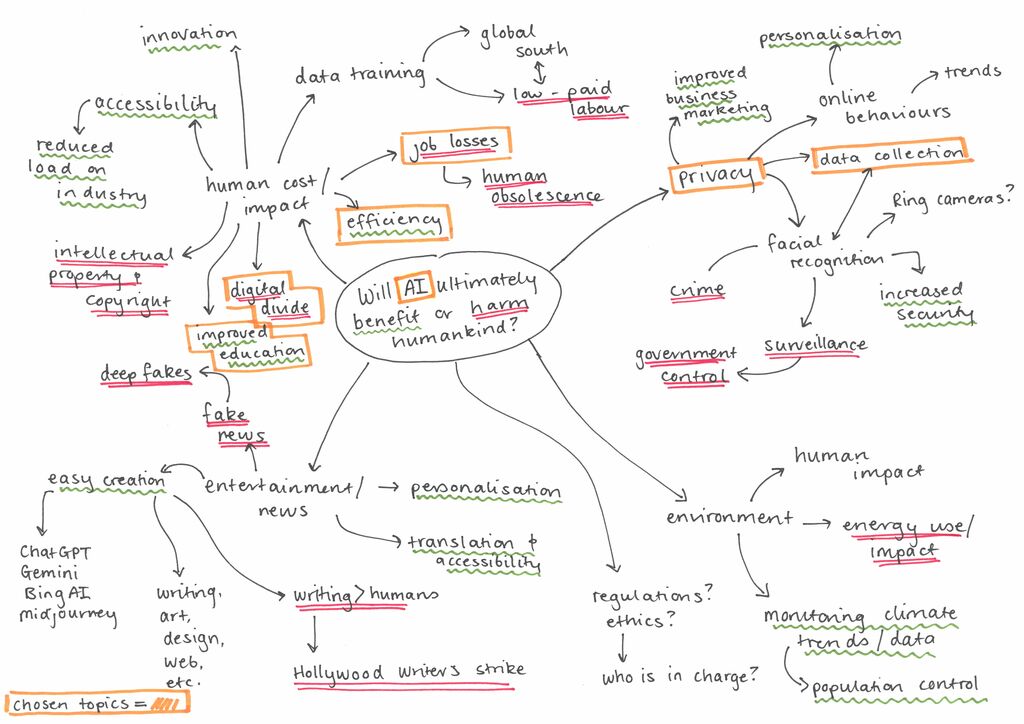
Top tips! If you are creating your own question, your brainstorm will help you to choose areas of focus from your broader topic. Your aim is to develop a question that is specific enough that you can get a manageable amount of relevant information, but not so specific that no research is available.
At the bottom of your brainstorm, write down a draft or potential research question. This can be improved more in the research phase, but it will help give you a direction as you begin test searching. </div>
Freewriting Freewriting is also known as stream of consciousness, and works like a brainstorm. To do it, set aside dedicated time to write ideas and thoughts as they come to you, without worrying about structure or organisation. It lets you to explore concepts in a free and flexible way and come up with ideas that can be later turned into into a the basis of an assessment.
Method
- Write your question at the top of a document (use a program like Word or Pages).
- Set a timer for 20 minutes. Use this time to write non-stop without pausing to edit or structure. The goal is to write down your thoughts about the topic in full, including any thoughts, ideas, questions or concepts related to the topic.
- Let your mind lead you from one idea to another. If something triggers a related thought, write it down even if it you are not sure it relates to your assessment question.
- When the 20 minutes is up, take time to look over and reflect on what you have written. Read through your notes, highlight key points, and group related concepts. Look for central or common themes in your freewriting.
- Based on your reflections, write a draft outline for your assessment.
Here is an example of what the freewriting process could look like:
Freewriting example [DOCX, 26.2kB]
Top tips! If you are creating your own question, freewriting may help you to find areas of focus from your broader topic. Your aim is to develop a question that is specific enough that you can get a manageable amount of relevant information, but not so specific that no research is available.
At the bottom of your brainstorm, write down a draft or potential research question. This can be improved more in the research phase, but it will help give you a direction as you begin test searching. </div>
Test searching Test searching is a quick, first search to easily find out if you will be able to find enough information on your topic. Using any concepts or ideas you have identified, do a quick search in the Library catalogue or Google Scholar using at least two concepts (make sure you are being specific, because using just one word does not usually get useful search results).
Top tips! If you are developing your own question, you can use the test search to find areas of focus in your broader topic that you might not be aware of. You can try checking out the Wikipedia page for your broader topic. Is there anything that interests you that you can add into your research? </div>
Getting too much or irrelevant information
Never search with a single concept, because your results will contain everything that has ever been published with those words - a lot of it won’t be relevant. Be more specific by including more concepts. They may come from your question, or from your brainstorming/freewriting exercises. Examples of concepts you could add include:
- By demographic (for example, among teenagers, among elderly Australians, among the LGBTQI+ population)
- By location (for example, in rural communities, in Australia, in the Global South)
- By industry (for example, entertainment, medicine, finance, mining)
- By time period (for example, in the 21st century, in the last five years, since the COVID pandemic, during lockdowns)
Not getting enough information?
If you find too little information or do not find anything, you may need to modify your question or broaden your topic. For example, instead of “the impact of artificial intelligence on Hollywood screenwriters”, you could broaden your topic to “the impact of artificial intelligence on the entertainment industry”.
If you have completed your test search and you cannot find anything that looks relevant, do not worry! Discover strategies to help you improve your search in our Finding Information guide.
Assignment plan
Developing an assessment plan comes naturally after developing your ideas. Fill in the asessment plan template to work out the next stages of the assessment process.
- Assignment plan template - question provided [DOCX, 34kB] Using feedback
Feedback from your lecturers and tutors is a useful source of information that can help improve your academic grades. Reading and thinking about feedback can tell you about your strengths as well as areas for improvement.
You might get formal feedback through your assessment submissions, or more casual feedback during lectures, tutorials and group discussions. You might also get feedback in discussion boards and announcements on Blackboard. All of these forms of feedback can give you an opportunity to ask for information, ideas, and new outlooks. They also help you to understand your progress and work on any issues before you submit your next assessment.
In brief, you can use feedback by:
- Understanding, clarifying and prioritising key areas of improvement and using academic sources to solve problems
- Managing your feelings and responses through reflection and focusing on the learning.
</div>
Using feedback to improve assignments
To get the most out of feedback, write an action plan that describes how you will make use of the comments and suggestions provided. You can start collecting feedback as soon as you start your assessment, not just after submission. By asking for feedback early, you can make small improvements while you work on your assessment.
Feedback Action Plan Template [DOCX, 36kB]
Here are some tips to help you use feedback:
-
Read and understand the feedback
Look at the assessment brief and marking rubric as you go. Re-read the key points to make sure you have understood the feedback correctly.
-
Seek clarification
Write down any points that you don not understand so you can ask your tutor for clarification.
-
Identify and prioritise key areas for improvement
Write priorities and goals to use the feedback in your action plan. Remember, you do not have to tackle every piece of feedback at once; focus on parts that were mentioned most often. For example, if you often get feedback that your referencing or the structure and flow of your writing need to be improved, include them in your plan and work on them one at a time.
Tip: Keeping a record of the feedback from all your assessments will help you spot and fix persistent issues. Look for repeating issues in your work, like referencing errors, unclear arguments, or grammatical mistakes. Think about how you can use this information to help improve on your next assessment. </div>
-
Find resources to help you improve
Check writing guides, workshops or academic support centres for help. Curtin Library offers lots of tools and services to help you work on your academic skills. Here are some examples:
- UniSkills: Assignment skills modules
- Referencing guides
- Referencing checklists for APA or Chicago
- Editing guide
- Assignment skills workshops
- Peer Academic Mentors (PAMs)
- Grammarly
- Check out the Curtin Library Gen-AI Guide and explore the Prompt Library—a resource for using Gen-AI to give feedback on academic writing.
Managing feelings about critical feedback Critical feedback is feedback that points out areas you need to work on in the future. Receiving critical feedback can feel discouraging, but always try to look at it as a learning opportunity. You should:
- Take some time to reflect on, and process the feedback. This helps settle the emotions you feel after your first read through.
- Try not to focus on the mark. Instead, carefully read the marker’s comments. This will help you understand what you did well and areas you need to work on.
- Focus on the goal of learning. Feedback is about learning, not a personal criticism. Your lecturers and tutors want you to succeed in your studies. When they provide feedback, their goal is to help you succeed.
- Pay attention to positive feedback, not just critical feedback. This highlights what you are doing well and helps you to build on your strengths in future assessments.
- Consider talking about the feedback with your classmates to look for common trends and see how your experience compares with others.
Remember! Academic study requires you to have scholarly conversations. When you take part in the coversation, ask questions and are open to different points of view, you gain control of your own learning.About UniSkills
UniSkills was created and is maintained by Curtin University Library. To report issues with UniSkills contact Library Help.
Twemoji icons by Twitter, Inc and other contributors, licensed under a CC-BY 4.0 licence.
Except where otherwise noted, UniSkills content in all it’s forms (website, PDFs etc) are licensed under a Creative Commons Attribution ShareAlike 4.0 International Licence. We ask that you attribute any use of the content as created by Curtin University Library with a link to the Library website.
This license does not extend to other Curtin University and Curtin University Library webpages, or to Curtin branding and trademarks. Curtin University’s copyright information is available on the Curtin website.